Convert EPUB to PDF When You Need Pages, Not a Reflowing Book
EPUB is a website in a zip: it reflows on a phone. PDF is a stack of pages. People ask for EPUB→PDF to print, to annotate in a tool that only opens PDF, or to send a professor a file that will not reflow mid-paragraph. The layout will change. That is the job succeeding, not failing.
In Shrynk this pair is an ebook card. It calls Calibre’s ebook-convert. If Calibre is not installed (or not on PATH), the card stays unavailable. That is documented, not a silent crash. EPUB → Markdown and EPUB → HTML are different converters and do not need Calibre.
Install Calibre before you blame Shrynk
| Symptom | Cause | Fix |
|---|---|---|
| Ebook cards grey / error about ebook-convert | Calibre missing | Install Calibre, restart Shrynk. |
| EPUB → MD works, EPUB → PDF fails | Expected split | MD/HTML path is built-in. PDF path is Calibre. |
| You wanted PDF → Word | Wrong product | We do not convert PDF to DOCX. Stop here. |
Kindle .azw3 / .mobi to PDF | Same Calibre family | azw3 → pdf or mobi → pdf. Same embedFonts toggle. |
Put Calibre on PATH or use the standard install location so Shrynk can find ebook-convert. Corporate PCs that block installers will not get this pair.
The one option: embed fonts
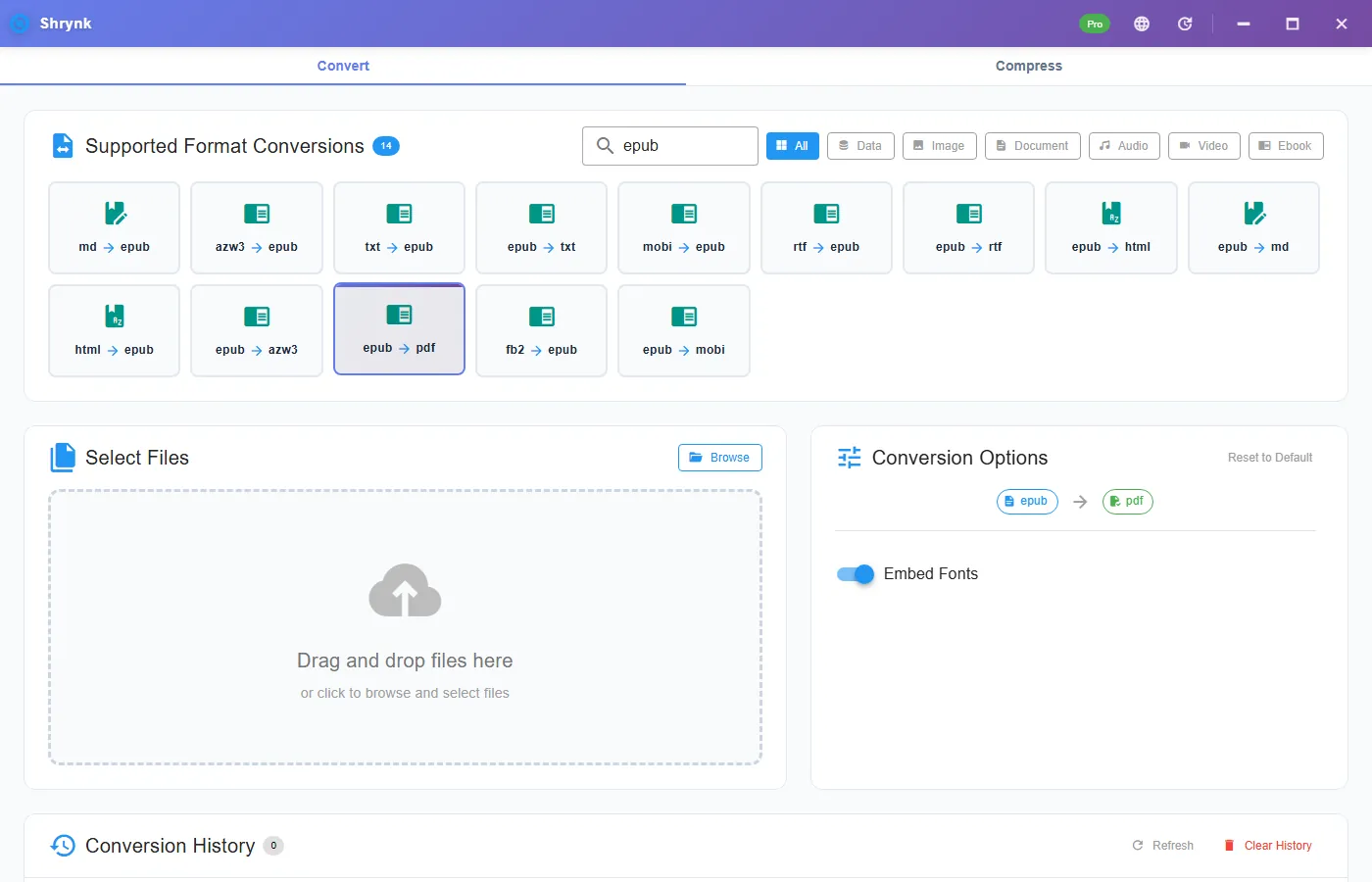
embedFonts, boolean, default on. Leave it on so faces Calibre can embed travel with the PDF. Turn it off only if someone asked for a smaller file and accepts Times-looking substitution. There is no “paper size” or “margin” picker in Shrynk’s panel — Calibre uses its defaults. If you need A4 vs US Letter control, run Calibre’s own UI once; this product is the one-click path, not a typesetting suite.
Steps
- Install Calibre, then Shrynk.
- Convert → Ebook or search
epub→ epub → pdf. - Leave embed fonts on. Drop one EPUB you are allowed to convert (your export, not a DRM store file).
- Open the PDF. Check a chapter title, a picture, and a footnote. Reflowed tables becoming split pages is normal.
DRM (Kindle, Kobo store wrappers) will fail. We will not help strip it. Free = one file. A shelf of legally owned EPUBs is Pro batch. Timeout is generous (Calibre can take minutes on a image-heavy book) but this is not a 2000-page scanned-PDF factory.
MOBI / AZW3 to PDF
Same embedFonts flag. Amazon’s older MOBI and AZW3 go through Calibre the same way. Complex Kindle magazines still look worse than a simple novel. If you needed EPUB as the output (to read in another app), use mobi → epub / azw3 → epub — not this PDF article.
When you wanted Markdown instead
Notes and editing: epub → md or epub → html without Calibre. That is a text-ish dump, not a print replica. Word: we do Markdown→DOCX, not EPUB→DOCX as a first-class pair. PDF→Word does not exist here. See Markdown to Word if your source is already .md.
Failures that look like bugs
- Missing fonts / tofu. Embed was off, or the EPUB never bundled the face. Turn embed on; still broken means the EPUB pointed at a font Calibre could not embed.
- Cover only, empty body. Broken EPUB spine, or DRM. Open the EPUB in Calibre’s viewer first.
- Huge PDF. High-res images inside the EPUB. Expected. This is not the video compressor.
What this will not do
- PDF → Word, PDF → EPUB of a scan (OCR).
- Run without Calibre on the PDF route.
- Bypass store DRM.
What to check in the PDF (not just the cover)
Open page 2, a chapter that had a pull-quote, and the last chapter. Covers often survive even when the spine is broken. If page 2 is blank but the EPUB opens in Calibre’s viewer, the EPUB is fine and Calibre’s PDF output used a page size that hid content — rarer than a bad EPUB, but it happens on fixed-layout kids’ books. Fixed-layout EPUB is already “trying to be PDF.” Results vary; a novel is the happy path.
Images: a photography EPUB can produce a 200MB PDF. That is the pictures, not a loop. We do not downscale those images on this card. If you needed a 5MB email, you needed a different pipeline (print to PDF from a reader at lower quality, or compress the PDF elsewhere). Shrynk Compress is video, not PDF.
Legal: convert your export, Project Gutenberg, or a file the license allows. A Kindle download with DRM is not “your EPUB.” The error is the point.
Calibre updates: if ebook-convert breaks after a Calibre upgrade, restart Shrynk so it sees PATH again. Portable Calibre that is not on PATH will look like “not installed.” Add it or use the official installer. First run does not install Calibre for you — only WebView2 notes for the shell.
If you only needed to read the book on a PC, install an EPUB reader and skip PDF. PDF is for print and annotate-in-Acrobat workflows. Reflow is the reason EPUB exists. Do not PDF a novel “to make it better.”
What to check in the PDF (not just the cover)
Open page 2, a mid-book chapter, a list, a table, and one image. Covers often survive when the spine is broken. If chapter one is empty but the cover is pretty, the EPUB is sick — open it in Calibre’s viewer before you retry. A novel with a few images should be a few megabytes of PDF. A textbook with full-page figures can be 80–200MB. That is the images, not Shrynk “inflating” the book.
Page size will follow Calibre defaults, not your phone’s theme. Night-mode EPUBs do not become dark PDFs. Hyphenation and line breaks will differ from Apple Books. Annotate the PDF in a PDF app; do not expect EPUB highlights to copy over.
Legal: convert books you have the right to convert (your manuscript, a public-domain EPUB, a file the publisher said you may archive). A Kindle download with DRM is not that. The error is the point.
If you needed searchable text in a scan, this pair will not OCR a picture-EPUB into a real text PDF. Calibre will wrap the pictures. OCR is a different product. If you needed Word, export or write Markdown and use md → docx. PDF → Word is still not here.
Batch a course pack: Pro, one mapping, Calibre must stay installed. A missing PATH after a Calibre update is the usual “it worked yesterday” report — restart Shrynk after installing or moving Calibre. First run does not install Calibre for you.
FAQ
Why Calibre?
ebook-convert is the engine for this card. MD/HTML from EPUB is built-in.
Will it match the phone app?
No. Pages vs reflow. Check a chapter, not the cover only.
Legal?
Convert files you have the right to convert. Ebook table.
Download Shrynk. Install Calibre first for this pair.