How to Convert Markdown to Word (DOCX) Without Losing Formatting
You wrote the spec in Markdown because that is how you think. Legal, a client, or a manager still wants a .docx they can comment on. The job is not “make it open in Word.” The job is to keep Heading 1/2/3 as real styles, lists as lists, and tables as tables, so Navigation pane, Track Changes, and a company template still work.
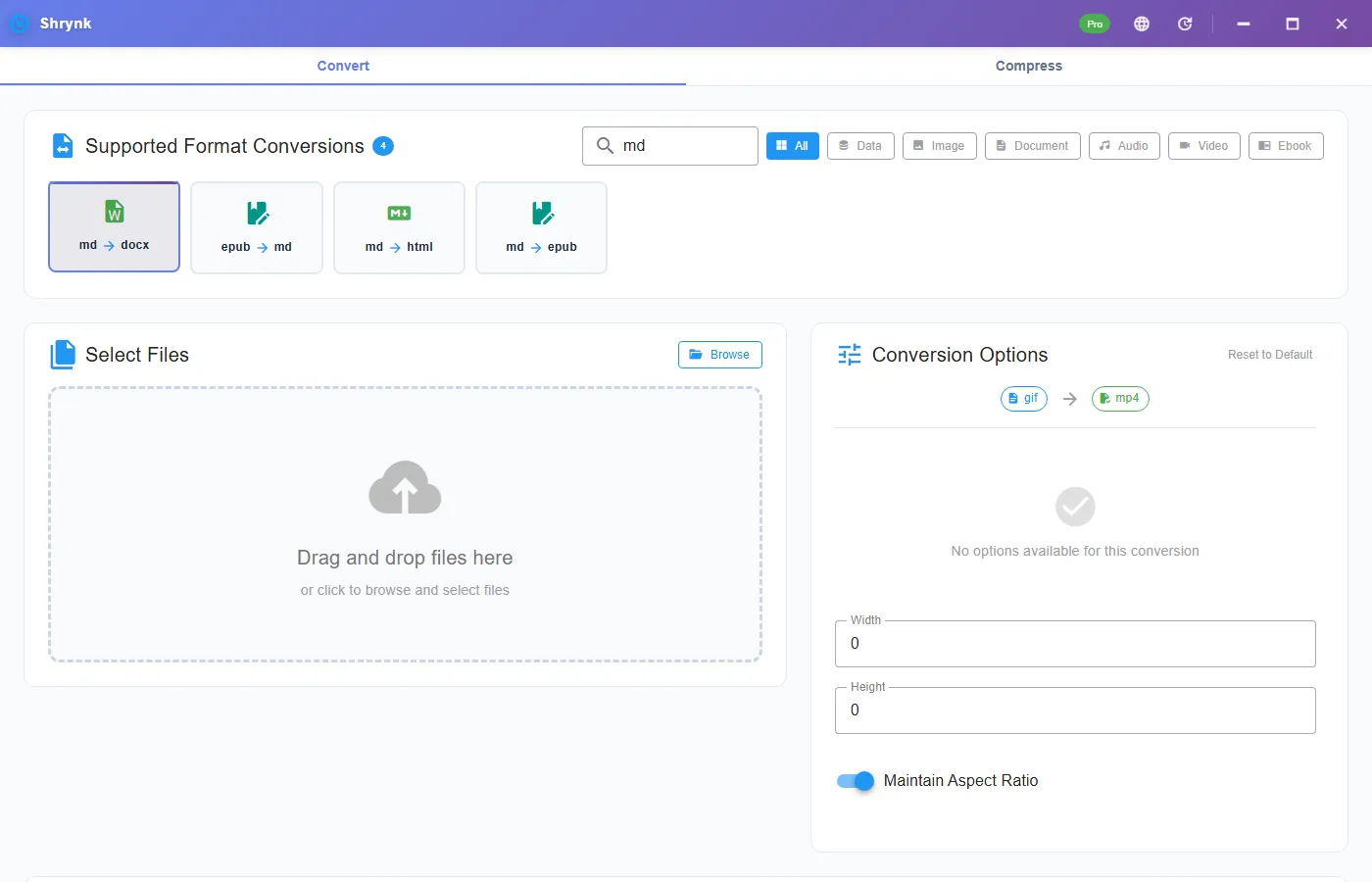
Shrynk’s desktop Convert tab does md → docx (and markdown → docx) locally. There are no extra options on that pair: the mapping is the product. It does not convert PDF to Word. If that is the search you meant, stop here.
What “survived” actually means
After a conversion, open the file in Word (or LibreOffice) and check the Home ribbon and the Navigation pane, not just the first screen.
| In the .md | You want in Word | What usually fails |
|---|---|---|
# / ## / ### | Heading 1 / 2 / 3 styles | Pasted preview: “Normal + bold”, TOC and outline break |
- / 1. | Bullet / numbered lists | Lines that only look like lists |
GFM pipe table + |---| | A Word table with a header row | ASCII art tables aligned with spaces |
[text](url), `code` | Clickable link, monospaced run | Raw markdown left in the paragraph |
Local image  | Embedded picture in the docx | Broken path if you moved the .md without the image |
| Mermaid, shortcodes, some footnotes | — | They do not become Visio/SmartArt. Export a PNG first or delete them |
Shrynk’s Markdown to DOCX path embeds common raster images that sit next to the file (PNG, JPEG, GIF, WebP). If the image path is wrong, the run still finishes; that cell is just empty. Check the pictures before you send the file.
Why paste-from-preview keeps biting you
A GitHub or VS Code preview copied into Word looks fine until someone applies “Heading 1 = navy, 16pt” from a template. Then every “heading” is still Normal text with leftover bold. Comments attach to the wrong outline. A dedicated conversion maps markers to styles once. That is the difference between a dump and a document.
Opening the .md directly in a recent Word build is better than paste, but versions disagree on tables and images. If you have to send the same folder every Friday, do not depend on “Word felt like it that day.”
Do this in Shrynk (one file)
- Install Shrynk for Windows (free). First-run notes: Install and first run.
- Stay on Convert. Filter Document or search
docx. - Click the Markdown → DOCX card. The options panel stays empty on purpose; this pair has no quality slider.
- Drop one
.mdor.markdownfile. If it references./images/foo.png, keep that folder next to the file. - Pick an output folder if you do not want the
.docxbeside the source. - Start. Open the result and check Navigation pane + one table + one image.
Free allows one file per run. That is enough to test a README. A docs/ tree is a batch job (Pro, $9 one-time).
Prepare the Markdown so Word does not surprise you
- Use a real header row and a separator line on every table. Do not draw boxes with
+and-. - Prefer ATX headings (
## Title) over underline-style Setext headings if you mix tools. - Put screenshots in a folder next to the .md. Avoid
http://images if the machine will be offline. - Replace Mermaid fences with an exported PNG. The converter will not compile diagrams.
- If the file is actually a Pandoc-flavored thesis (citations, YAML front matter you need as fields), Shrynk is the wrong tool. Use Pandoc. We map everyday GFM, not a research toolchain.
A file you can check in two minutes
Put this in check.md next to a PNG named shot.png, convert it, then use Word’s Navigation pane:
# Title that must become Heading 1
## Section that must become Heading 2
A paragraph with **bold**, a [link](https://getshrynk.com/), and `inline code`.
- Bullet one
- Bullet two
| Col A | Col B |
| ----- | ----- |
| keep | header |

If Heading 1 does not appear in the pane, the conversion failed the only test that matters. If the table is a paragraph of pipes, the source was not a GFM table. If the picture is missing, the path was wrong, not “Word hates Markdown.”
Pandoc vs Word Open vs Shrynk
| Tool | Use when | Skip when |
|---|---|---|
| Paste from preview | Never for a file someone else will template | Always, if you have a converter |
| Word “Open” on .md | One-off, recent Word, simple file | Tables, images, a weekly folder |
| Pandoc | Citations, custom templates, academic stack | You just need GFM to a normal docx on Windows |
| Shrynk | Local GFM, optional batch, same app as image/video convert | You need PDF in or DOCX back to Markdown |
Shrynk is the ConvertET engine inside one installer. It is not trying to replace Pandoc’s reference-doc templates. If your firm has a .dotx with 14 heading styles, convert first, then apply the template in Word. Do not expect the converter to load that template.
Send-to-client checklist
- Navigation pane shows every heading you thought you wrote.
- One table has a header row and is not a screenshot of a table.
- Images are inside the docx (email the one file, not a zip of pictures).
- No leftover
##or|---|in the body. - Accept Track Changes from a colleague once before you batch the rest of the folder.
When not to use this converter
- PDF → Word. Not implemented. Do not buy Pro expecting it.
- DOCX → Markdown. One way only.
- A full docs site. That is Hugo/Astro. For a single HTML file see Markdown to HTML.
- Tracked legal paper that already lives in Word. Convert once, then stay in Word. Do not round-trip .md ↔ .docx every edit.
Folder of specs
One mapping per run: all Markdown to DOCX, same output directory. Split drafts from published notes if you do not want both. Count files in vs files out. History in the app reopens the folder; details are in How conversion works.
FAQ
Does converting Markdown to Word keep headings and tables?
Yes for the usual GitHub-flavored set: headings as Word Heading styles, bold/italic, links, lists, blockquotes, fenced code, and pipe tables with a header row. Mermaid, shortcodes, and some footnote flavors do not become native Word objects.
Can Shrynk convert PDF to Word?
No. Markdown to Word and Markdown to HTML only. PDF is an output of some ebook routes, not an Office importer. See supported formats.
Is this the same as opening the .md in Microsoft Word?
No. Word’s Markdown support varies. A dedicated conversion exists so styles stay styles after a template is applied.
How do I convert many .md files at once?
Same card, many files or a folder, Pro license. Free is one file so you can verify the mapping first.
Need Word files from a folder of Markdown, on the PC? Download Shrynk for Windows. Free to install. $9 one-time for batch.