Convert GIF to MP4 for Smaller Files and Better Playback
GIF stores every frame as a paletted bitmap. MP4 (H.264) stores the difference between frames. For a 5-second screen recording or a reaction clip, that is often a 5–10× size drop at 720p with no extra smear you will notice in chat. Discord, Slack, and X play short MP4s natively even when people still say “send a GIF.”
Shrynk registers both directions: gif → mp4 and mp4 → gif. They are not mirrors. Going back to GIF throws away color and usually grows the file.
Keep GIF only when you must
| Keep GIF | Convert to MP4 |
|---|---|
| Looping icon under a second, few colors | Screen recording saved as GIF |
Email or CMS that only allows .gif and will not play video | Camera clip someone “downloaded as GIF” |
| Sticker that needs a transparent hole | Anything you will upload to Discord / Slack / X |
Transparency becomes a solid fill (encoder background, often black). If the sticker needs a hole, stay on GIF or use a pipeline that actually supports alpha (not this pair).
Shrynk options (real panel)
gif → mp4: one control, quality low / medium / high. Medium is the default. This is a video encode, not a “GIF optimize.” FFmpeg is bundled with the app; you do not install it yourself.
mp4 → gif: fps 1–30 (default 15) and width 160–1920 (default 320). Height follows. A 1080p source dumped to a 320-wide GIF is how you keep the file from exploding. Do not max both fps and width “to be safe.”
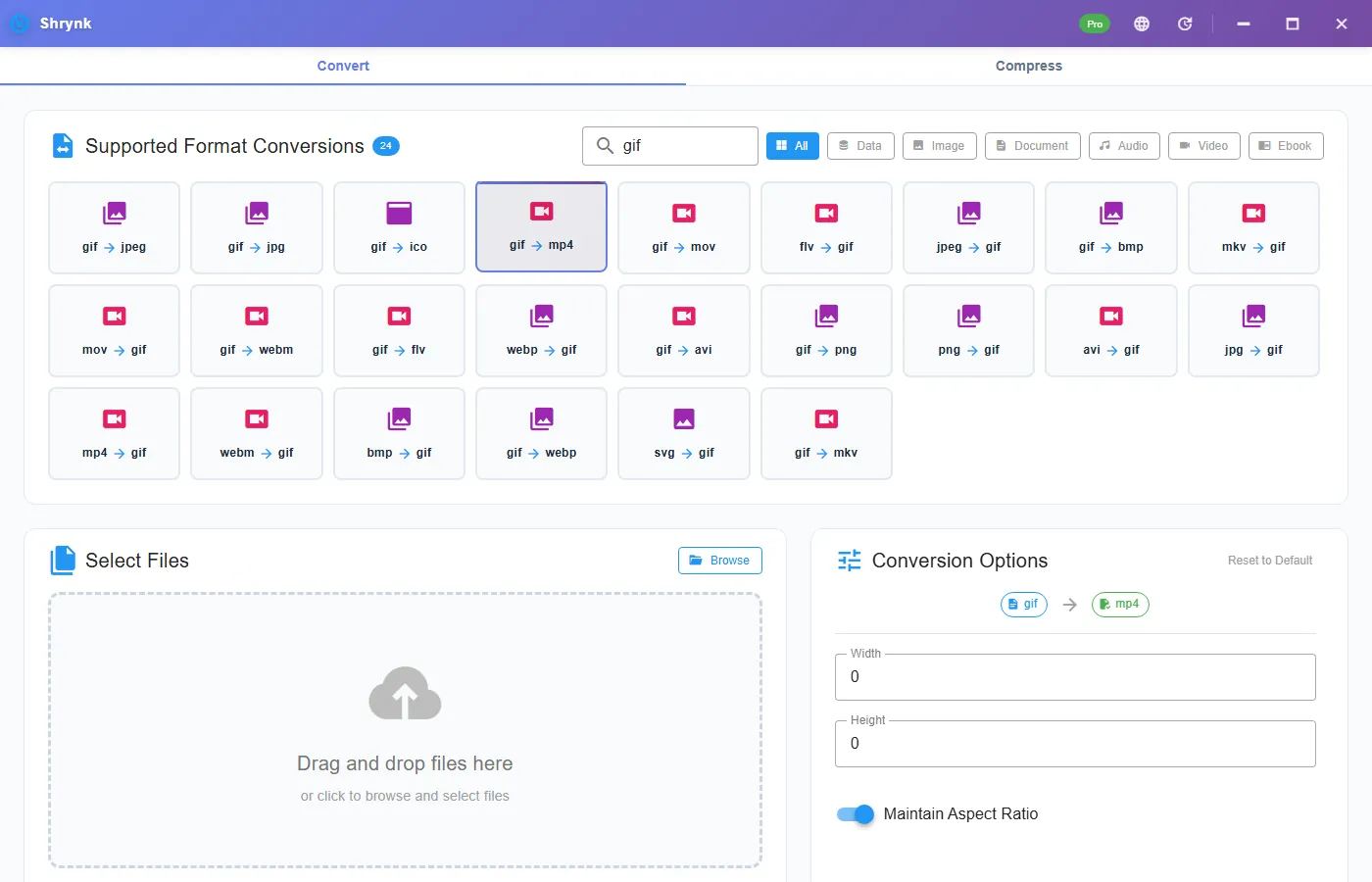
Steps: GIF to MP4
- Install Shrynk for Windows.
- Convert → Video → gif → mp4. Do not open the Compress tab and do not use the site compressor. That path does not import GIF.
- Leave quality on medium unless the GIF is already tiny (then high does little) or you only need a rough preview (low).
- Run. Play the MP4 once. If a chat app plays it once instead of looping, that is the player, not a failed convert.
- If Discord still rejects the file, the MP4 can still be over 10MB. That is a compress job on the MP4, not a second GIF convert.
Where the MP4 will loop (and where it will not)
- Discord / Slack / X: short MP4s play inline. Loop is the player’s choice; many will loop a silent clip.
- A web page you control:
<video autoplay muted loop playsinline>. The file itself still has no loop flag that every player honors. - Outlook and many webmail clients: one play, or they refuse video and wanted a GIF all along. If the ticket says “GIF only,” do not convert.
- iMessage: often treats a small MP4 like a loop. Do not bet a client delivery on that.
If the GIF had no audio (almost all of them), the MP4 is silent. That is correct. Do not “add a soundtrack” in a converter.
What a “5–10×” claim is not
It is not a promise for a 64×64 spinner. Those can be smaller as GIF. It is typical for multi-second, photographic or screen-capture GIFs. If your output is larger, you probably started from an already-tiny GIF or you used an unnecessarily high quality on a few-color graphic.
Typical sizes (order of magnitude, not a guarantee)
A 4–6 second screen-recorded GIF at roughly 600–800 px wide often sits in the 8–20MB range. The same motion as H.264 MP4 at medium quality is commonly 1–3MB. A 200KB emoji-style GIF may come out as a 150–400KB MP4; that is not a win, and you should have left it as GIF.
Quality low / medium / high on gif → mp4 is for the video encode. On a few-color graphic, medium and high look the same. On a photographic GIF, low will block faces. Start medium, look once, only then change.
Going the other way
Only convert MP4 to GIF when a destination refuses video. Expect 256 colors per frame and a bigger file. Start at 15 fps and 320 width. Raise width if text is unreadable; raise fps only if motion strobes. This is the pair people search after they already have a working MP4 and a stubborn CMS.
After convert: still over Discord’s 10MB
GIF to MP4 is not a size guarantee. A long, high-resolution GIF can still produce an MP4 above Discord’s free 10MB cap (25MB on Nitro). That is Compress on the MP4: target size ~9MB, or a lower quality preset. Do not convert GIF → MP4 → GIF to “make it smaller.” You will pay the 256-color tax twice.
GIF’s 256-color palette is why gradients look dirty before you even convert. MP4 will look cleaner on those clips. It will not invent colors that were never in a 16-color spinner; that file should have stayed a GIF.
Folder of memes
One mapping per run. Free = one GIF. Pro = the folder. Write output to a sibling directory so you do not bury MP4s inside a Downloads pile of GIFs. See batch jobs.
FAQ
Will the MP4 still loop like a GIF?
The file does not loop by itself. Players and sites that support looping video can loop it. Email often plays once.
Can I convert MP4 back to GIF?
Yes: fps and width on the reverse pair. Expect a larger, posterized file. Prefer MP4 for chat and the web.
Why did the browser tool reject my GIF?
It is a video compressor (MP4/MOV/MKV/AVI/WebM in, MP4 out). GIF is Convert on the desktop.
How much smaller is MP4 than GIF?
5–10× is common on 5-second 720p clips. Tiny icons are the exception.
Convert GIFs on Windows without uploading: download Shrynk. Free install. $9 one-time for batch.