Convert GIF to PNG When You Need a Still, Not a Smaller Loop
Search logs mix two jobs under “GIF to PNG.” One is a poster: a slide, a thumbnail, a print sheet that cannot play frames. The other is people who wanted a smaller file and picked PNG by habit. PNG will not shrink a 12MB reaction GIF into a neat still of the whole joke. You get frame one. The rest of the loop is gone. If you needed the motion, use GIF to MP4.
Shrynk’s desktop image converter is local (pure Go). gif.Decode returns the first frame. The box below does the same in this tab — first frame only, nothing uploaded. The homepage Compress tab still will not import GIF.
Still vs motion vs flatten
| You have | You want | Card |
|---|---|---|
| A GIF | One still for Word / a CMS that hates GIF | gif → png (this page) |
| A GIF | The same motion, smaller, in chat | gif → mp4 |
| A GIF | A JPEG for a “photo only” form | gif → jpg (quality 90) — expect dirt on UI |
| A WEBP still | GIF for a stubborn box | webp → gif |
| An MP4 | A GIF | mp4 → gif |
If frame one is a fade-from-black or a title card, the PNG will be that card. Open the GIF and look at frame one before you convert. We do not expose “frame 7.”
Options on gif → png
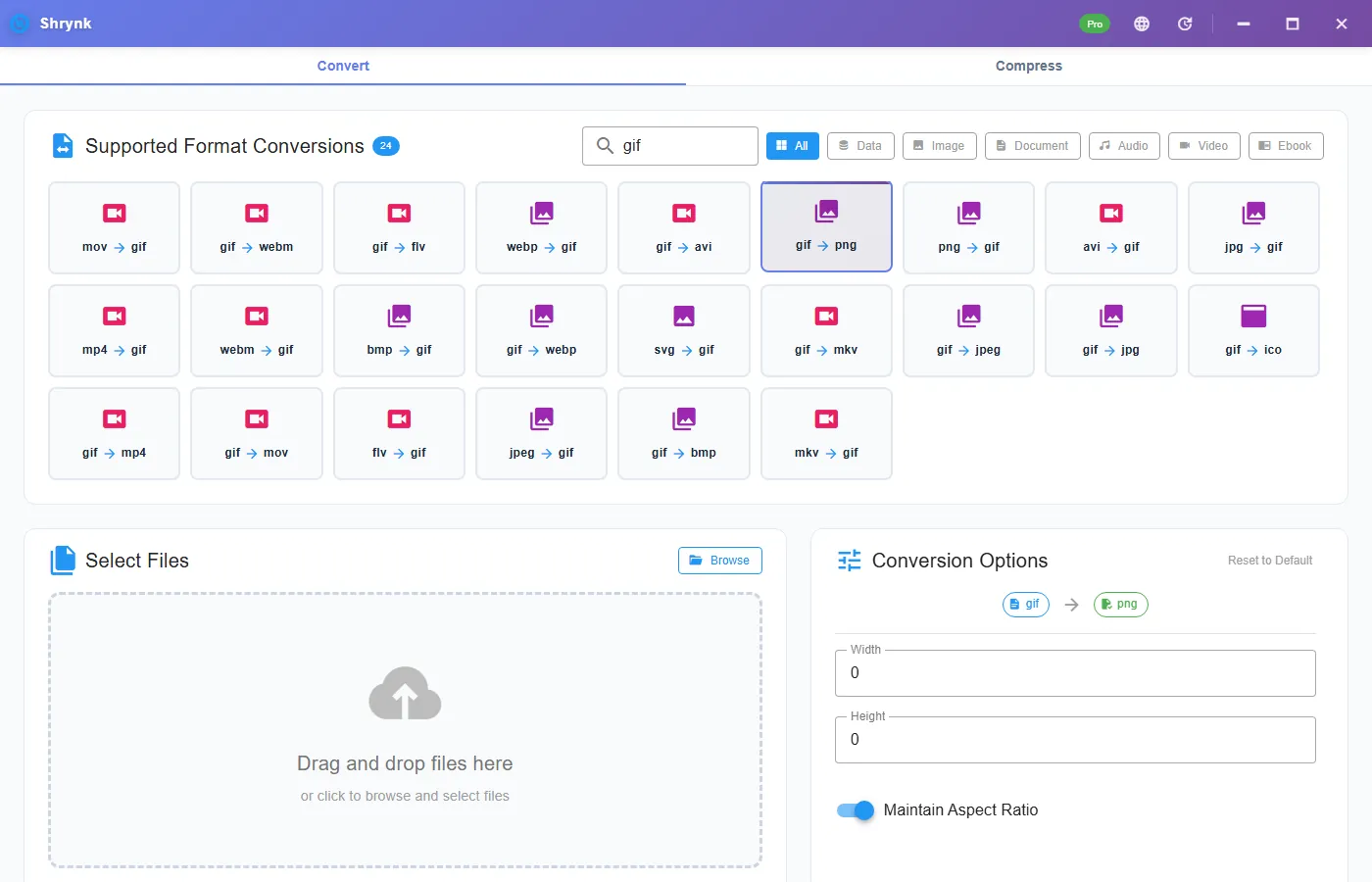
No quality slider. PNG is not JPEG. The panel is width / height (0 = keep) and maintain aspect ratio (on). Resize when a form caps the long edge. Do not resize to “make it look sharper” — Lanczos will not invent GIF colors that were never there.
Steps
- Scrub the GIF. If the useful picture is not frame one, export that frame elsewhere or accept the title card.
- Install Shrynk.
- Convert → search
gif→ gif → png. - Leave size 0 unless the destination named a width.
- Open the PNG at 100%. Compare it to frame one of the GIF, not to “the funny part at 0:02.”
Free = one file. A folder of emoji-style GIFs as PNG posters is Pro, one mapping. A folder of 8-second reactions probably wanted MP4, not this pair. First run.
Transparency and the 256-color tax
GIF “alpha” is usually one transparent index. PNG can store a real alpha channel, but we cannot invent a clean cutout from a halo of fringe pixels. A sticker GIF often becomes a PNG with a jagged edge or a leftover matte. If you still have the SVG or a designed PNG, use that. This pair is a dump of frame one, not a background remover.
The 256-color palette is already in the GIF. PNG will store those dirty gradients losslessly. The sky will not become a 24-bit photo. People who hoped PNG would “fix” a GIF are thinking of JPG→PNG mythology. Same trap, different container.
When the PNG is larger than the GIF
A 64×64 few-color GIF can be 2KB. The PNG may be 4–8KB. That is normal. A 800-wide photographic GIF may become a bigger PNG that still looks posterized. You did not fail the convert. You picked a still of a format that was already a compromise. If size was the goal and you needed motion, you wanted MP4. If size was the goal and you needed a still of a photo, you wanted the camera file, not this GIF.
Failures that look like bugs
- Wrong moment. Frame one. Expected.
- It does not move. PNG is a still. You wanted gif → mp4.
- Halo around the character. Key-color fringe. Not a Shrynk flatten bug unique to us — that is GIF.
- The website compressor rejected the file. Correct. Video only, and it does not import GIF.
What this will not do
- A sprite sheet of every frame.
- APNG or an animated PNG.
- Background removal / cutout AI.
- HEIC or PDF pages.
Check it like a thumbnail pipeline
Take a 3-second reaction GIF you know well. Convert to PNG. The PNG should match the first displayed frame, including any “Posted by” watermark sitting on frame one. Then convert the same GIF to MP4 (medium). Play the MP4: the joke should be there. If you only needed the watermarked still for a spreadsheet, the PNG is the deliverable. If you mailed the PNG and people said “this isn’t the meme,” you used this page by mistake.
Word and PowerPoint import PNG. They will also import GIF and sometimes play it. If the slide must not animate in presenter view, PNG is the right flatten. If the slide should play, keep the GIF or use MP4 where the host allows video.
Batch: do not run a Downloads pile of mixed memes and UI icons through gif → png “to clean up.” Icons may be fine. Memes lose the punchline. Split the folder. Batch is one mapping. Local files.
If the GIF is interlaced or has a Netscape loop block, the PNG will not inherit “loop forever.” PNG has no loop. People who open the PNG in a browser and wait for motion are on the wrong file. Send the GIF or the MP4 if they needed motion. This page is a still for a ticket, a slide, or a print proof of frame one. If they needed every frame as a strip, export frames in another tool — we do not write a sprite sheet.
Thumbnails for a catalog vs one meme
A product catalog of 40 short GIFs as PNG posters is a real Pro batch: one mapping, output in out\, count 40 in 40 out. Name collisions (every file download.gif) will overwrite if you dump into one folder. Rename first or use separate output directories. Shrynk does not add _frame1 for you.
A single Discord meme: if the first frame is the punchline, PNG is a fine still for a ticket. If the punchline is frame 40, this pair will embarrass you in the PDF. Screenshot the right moment from a player, or use gif → mp4 and grab a frame from the MP4 in Photos. That is two tools; we do not ship a frame picker.
Print: a GIF upscaled to 300 dpi on a 3-inch slot is still 256 colors. The PNG will look like the GIF, just larger on disk. Tell the shop it is a web graphic. Do not promise photographic print. Free vs Pro.
FAQ
Every frame?
No. First frame. Motion is gif → mp4.
Quality slider?
No. Width/height only.
Need the loop smaller?
GIF to MP4. Formats: matrix.