Convert WEBP to GIF Only When the Box Still Says GIF
Chrome ads and sticker packs arrive as WEBP. A 2014 CMS, an email template, or a “meme upload” field still asks for .gif. That search is “WEBP to GIF.” In Shrynk this is the still-image mesh, not the video encoder. You get one frame (usually the first) and 256 colors. Animated WEBP does not become an animated GIF on this card. If you needed the loop, this pair is the wrong family.
Photos that must leave WEBP belong on WEBP to JPG or WEBP to PNG. Motion that is already a video belongs on MP4 to GIF.
Pick the card for the job you actually have
| Source | Need | Card |
|---|---|---|
| Still WEBP, form says GIF | A .gif they will accept | webp → gif (this page) |
| Still WEBP, screenshot / alpha | Sharp edges | webp → png |
| Still WEBP, camera photo | JPEG-only form | webp → jpg, quality 90 |
| Animated WEBP, need motion | Not this converter | Export video elsewhere, or keep WEBP |
| MP4 / screen recording | GIF loop | mp4 → gif (fps + width) |
If you open the WEBP in a browser and it moves, this card will still freeze frame one. That looks like a bug. It is gif.Decode / still encode, not a video pipeline.
Options: resize only
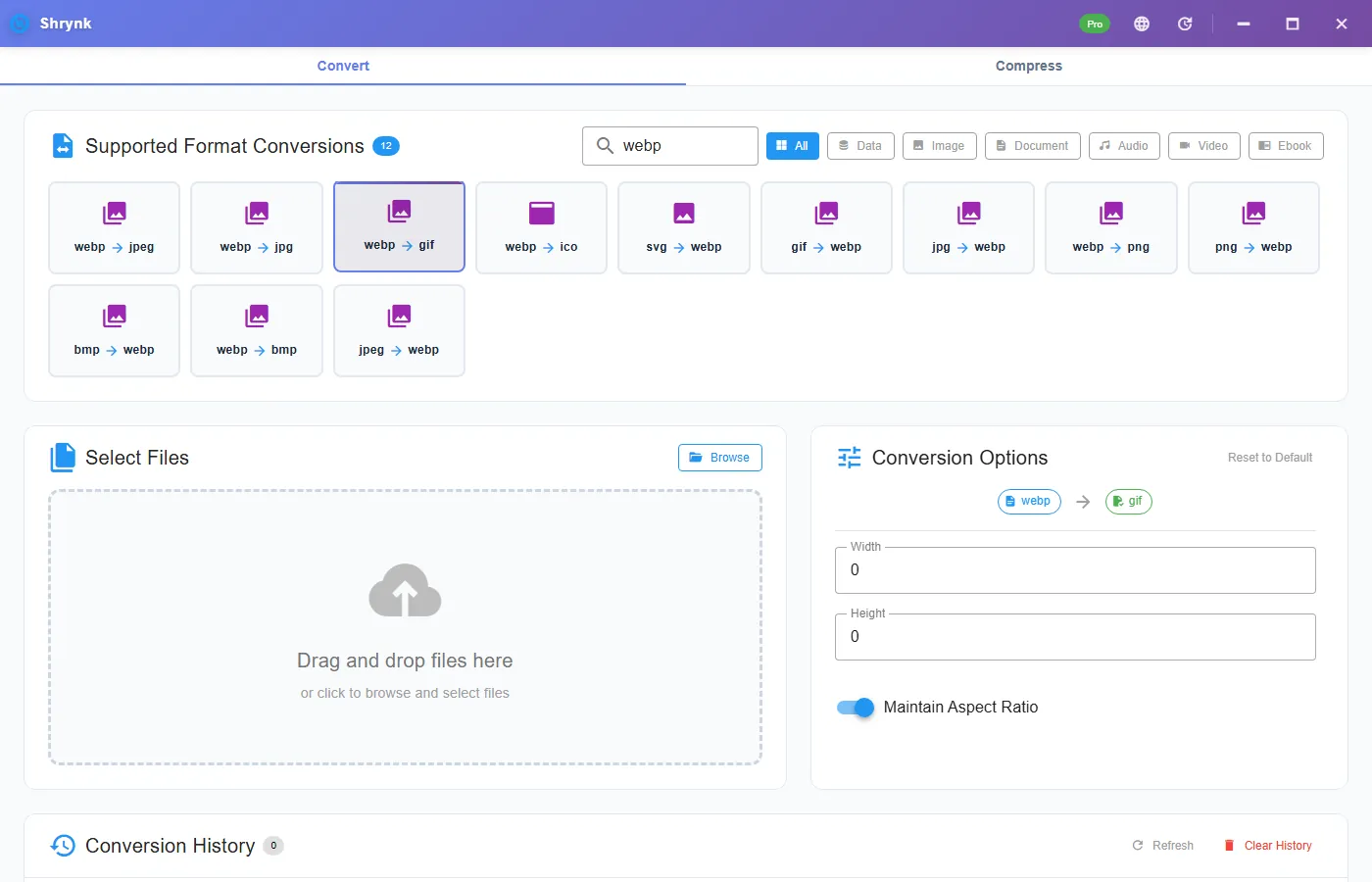
There is no quality 1–100. That slider is JPEG-only on this mesh. webp → gif shows:
- Width / height, 0 = keep the decoded pixels (max 10000).
- Maintain aspect ratio, on by default.
GIF encode uses 256 palette colors. You cannot “raise quality” to keep a face. You can shrink the long edge so a 4000-px poster does not become a 8MB still-GIF for no reason.
Steps
- Open the WEBP once. If it animates, decide whether a poster frame is enough. If not, stop.
- Install Shrynk.
- Convert → search
webp→ webp → gif. - Leave size 0 for a small icon. Set width 320–640 if the source is a huge marketing dump.
- Open the GIF. Count frames in a viewer that shows the frame list. You should see one. Check a letter edge: 256 colors will stair-step gradients.
The browser preview will not write a GIF (stills go to JPG/PNG/WEBP; compress is video). Free desktop = one file. A folder of ad creatives is Pro, one mapping. Do not mix photos you meant to JPEG into a GIF batch. First run.
Why the GIF looks dirty
GIF is a 256-color palette per frame. A photographic WEBP (already quantized by a CDN) becomes a watercolor. That is the format. A few-color logo or a flat UI pointer can look acceptable. If the WEBP had a soft alpha hole, GIF’s “transparent” is one key color, not a nice ramp. Expect a jagged halo. For a sticker, stay on PNG.
File size: a still GIF is sometimes larger than the WEBP. WEBP exists because it is smaller. You convert because the destination is stubborn, not because GIF is “the web format” in 2026.
Animated WEBP, first frame empty
Some ad WEBPs use a blank or a single-color first frame. The GIF will be that blank. Open the WEBP, pause on frame one, before you file a bug. We do not expose a “frame index” picker. If the poster is frame 12, export that frame from a browser or a video tool, then convert the still.
Failures that look like bugs
- It does not loop / does not move. One frame. Expected.
- Face is a mosaic. Photo as GIF. Use JPG.
- White box around the mark. Alpha flattened to a key color badly. Use PNG.
- You used webp → jpg and renamed to .gif. Magic bytes will fail. Run this card.
What this will not do
- Animated WEBP → animated GIF.
- HEIC, RAW, or a browser-tab still convert.
- True alpha stickers.
- fps / width like
mp4 → gif. Those keys are on the video pair only.
A two-minute check
Convert a 32-px UI WEBP and a 2000-px photo WEBP with the same card. The icon GIF should stay readable at 100%. The photo GIF should look worse than the WEBP. That pair of results is the product working. If both look identical to PNG, you clicked webp → png. If the photo GIF is 15MB, you left width 0 on a poster — set 640 and run again from the WEBP.
Email the GIF to yourself. Some tenants strip animation (irrelevant here — you have one frame) or block GIF over a few megabytes. A 200KB icon goes through. A 6MB still-GIF may not. Resize first. Privacy: nothing uploads during convert.
Email, Slack emoji, and “GIF only” libraries
Slack custom emoji wants a small GIF (often 128). Set width 128 (minimum on some video pairs is 160; this still pair allows smaller if you type it — stay within 1–10000). A 2000-px WEBP dumped at width 0 will miss the emoji cap. A still emoji does not need 15 fps; you have one frame.
Email templates that strip <video> and <img src=".webp"> sometimes still allow GIF. A one-frame GIF is a clumsy PNG. If they also allow PNG, send PNG. If they only allow GIF, this card is the compatibility shim, not a creative choice.
Do not run webp → gif → png to “restore color.” You pay 256 colors and never get them back. From the WEBP, pick the real target once: PNG, JPG, or this GIF. Batch the same mapping for a folder of icons, not a folder of photos.
Windows Photos may play an animated WEBP and then show your GIF as a still. That is the convert, not Photos “breaking” the file. A frame-list viewer (ezgif in a browser, or a GIF editor) should report 1 frame. If it reports 20, you did not use this card — you copied the original WEBP or used a different tool. Keep the WEBP until you have counted frames. Shrynk does not delete the source. Write the width you used in the ticket so the next person does not rerun at width 0 and mail an 8MB still. Free vs Pro.
FAQ
Keep the animation?
No. First frame only. This is not the video GIF encoder.
Quality slider?
No. JPEG only. Width/height + 256 colors.
Need PNG or JPG instead?
WEBP to PNG or WEBP to JPG. Matrix: formats.