Convert WEBP to JPG (or PNG) Without Uploading the Image
Chrome, Android, and most CDNs save photos as WEBP because the file is smaller than JPEG at similar quality. Then older Outlook, a print-shop form, or a CMS that only lists JPG/PNG rejects the attachment. The fix is a local decode and re-encode, not a website that keeps a copy of a client shoot or a private chat export.
Shrynk’s desktop image converter is local (pure Go, no FFmpeg). One WEBP in this tab also works — canvas, no upload, first frame only if the file is animated. A folder, ICO, or a file over about 25MB belongs in the Windows app.
JPG vs PNG (the only decision that matters)
| Source | Target | Why |
|---|---|---|
| Camera photo, product shot, landscape | JPG, quality 80–90 | You will re-encode once. That is expected. PNG will be huge for no visible gain on a phone screen. |
| Screenshot, UI, logo, text on a flat background | PNG | JPEG ringing around glyphs. If the WEBP had alpha, JPEG drops it. |
| Sticker / cutout with a hole | PNG | JPEG cannot store transparency. You get a filled rectangle. |
| Animated WEBP | Not this pair | Still convert keeps one frame. Use video/GIF if you need motion. |
If you already know you need PNG, search webp → png in the same app. This article stays on JPG because that is the phrase people type when a form said “JPEG only.”
What Shrynk actually changes
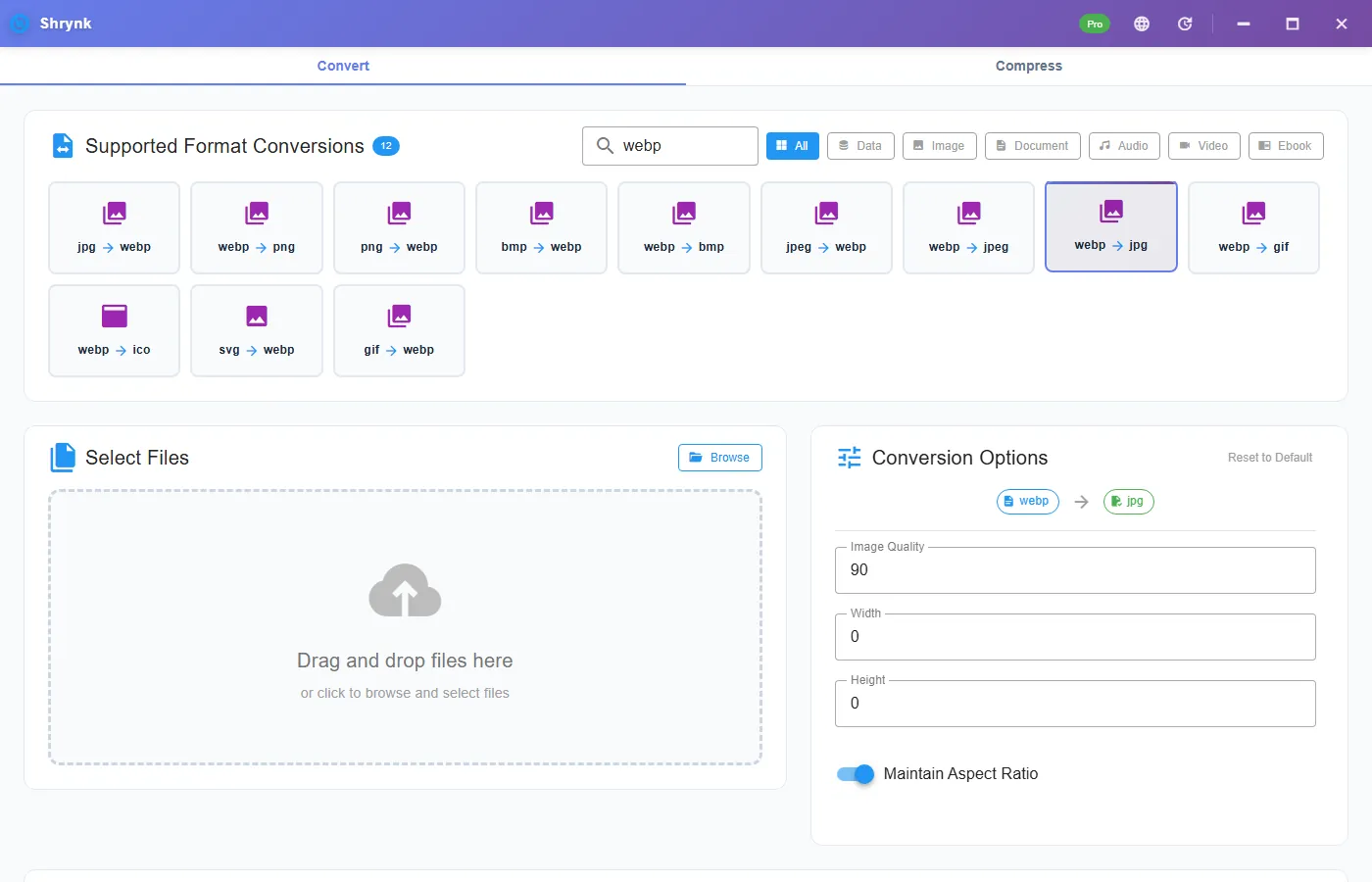
On WEBP → JPG / JPEG the options panel shows:
- Quality 1–100, default 90. This is JPEG quality, not a “lossless WEBP” toggle. 90 is conservative. 80–85 is the usual email/CMS trade. Below ~70, faces and sky posterize.
- Width / height in pixels, 0 = keep the source size. Use this when a form also caps dimensions (for example “longest side 2000”).
- Maintain aspect ratio (on by default). If you set only width, height follows. Turn it off only when you intentionally want a stretch.
There is no “make it sharper than the WEBP.” You cannot invent detail JPEG already threw away on the CDN, or that WEBP already quantized.
Steps in the app
- Download Shrynk for Windows. See first run if WebView2 is missing.
- Convert tab → Image → webp → jpg (or jpeg; same codec).
- Set quality. Leave 90 if you are unsure. Set a max width if the destination is a 1920-wide hero, not a 4000-px phone dump.
- Drop the file. Compare the two sizes in the result row before you delete the WEBP.
- Open the JPG in Photos. Zoom to 100% on a face or a sky gradient. If you see banding, raise quality and run again from the original WEBP, not from the first JPG.
Never JPEG → JPEG → JPEG. Each pass adds blocking. Always start from the WEBP (or the camera file).
Quality 90 vs 80 vs 70
These are JPEG quality numbers in Shrynk, default 90:
- 90–100: archive or print-adjacent. File stays large. Use when the WEBP was already a photo you might crop later.
- 80–85: mail, CMS, a slide. Faces stay intact at phone size. This is the usual “form asked for JPG” setting.
- 70 and below: thumbnails and emergency size caps. Sky banding and dirty edges around hair. Do not use on a client hero.
A 12 MP phone WEBP at quality 90 is often still several megabytes. If the form says “under 2MB,” set a width cap (1920 or 1600) and quality 80. Resizing does more work than dropping quality from 90 to 85.
Where the WEBP came from
- Chrome “Save image as”: usually a still photo. JPG is correct.
- Android share / WhatsApp: may already be small and a bit soft. Converting to JPG at 90 will not restore it. Do not also resize down unless the form forces it.
- App screenshot saved as WEBP: PNG. JPEG will chew the text.
This is not HEIC
iPhone photos are often HEIC, not WEBP. Shrynk’s current image mesh is JPEG, PNG, BMP, WebP, GIF, plus SVG and ICO routes. There is no HEIC decoder in this build. If Explorer shows .heic, this article does not apply. WEBP is the Chrome, Android, and CDN file. Running the wrong pair is how people think the app is broken.
Failures that look like bugs
- White or black box around a logo. You targeted JPG. Use PNG.
- Only the first frame of a meme. Animated WEBP. This converter is stills.
- Form still rejects the file. Some forms want
.jpegnot.jpg, or a size cap you did not hit. Check the extension and the KB, not just the format name. - Colors look dull vs Chrome. Wide-gamut WEBP into JPEG often lands in sRGB. For print, ask the shop for their profile; this tool does not do CMYK.
Folder of Chrome “Save image as”
One pair per run. Do not mix screenshots (PNG) and photos (JPG) in the same batch if you care about the result. Output beside the input or into out\ so you can count 40 in, 40 out. Free = one file. Pro = folder. Same rules as batch convert.
Outlook, print shops, and “JPEG only” forms
Older Outlook desktop builds still mishandle WEBP in attachments; they may show a blank tile or block the send. A JPG at 80–85 and longest edge 1920 almost always goes through. Print shops that say JPEG mean a flattened, sRGB, reasonably sized file. They do not mean “keep the 4000-px WEBP and change three letters of the extension.” Rename-only is not a conversion. The decoder has to run.
If a CMS rejects the JPG as “invalid image,” you may have hit a dimension cap, not a format cap. Set width to their documented maximum and convert again from the WEBP.
Built-in Windows vs Shrynk
Paint and Photos can Save As JPG for one picture. They will not apply one quality and one max edge to a directory, and they will happily let you overwrite the WEBP. Shrynk writes a new file and keeps the source.
FAQ
Should I convert WEBP to JPG or PNG?
JPG for photos without transparency. PNG for UI, screenshots, logos, and alpha. JPEG flattens transparency and smears edges.
Does converting WEBP to JPG lose quality?
Yes. Default quality 90. Use 80–85 for mail. Do not recompress the JPG. Screenshots should not go to JPEG at all.
Does this upload my photo?
No. Desktop convert reads a path on disk. The website compressor never sees still images. More: local files.
Can I convert a whole folder?
Yes, one mapping, Pro for more than one file. Pair list: supported formats.
Convert WEBP on the PC: download Shrynk. Free install. $9 one-time for batch.