Convert WEBP to PNG When You Need the Edges Intact
Chrome and Android love WEBP. Design tools, print shops, Slack workspace icons, and a long tail of “PNG only” uploaders do not. If the file is a screenshot, a logo, or a sticker with a hole, the target is PNG, not JPEG. JPEG will ring around type and fill transparency with a flat color.
This page is the PNG path. Camera photos that a form marked “JPEG only” belong on WEBP to JPG. Same app, different card, different failure mode. One file can also convert in this tab (canvas, no upload). A folder of Chrome “Save image as” is Pro batch on Windows.
PNG vs JPG for a WEBP you already have
| Source looks like | Target | Why |
|---|---|---|
| UI, terminal, tweet screenshot, icon | PNG | Hard edges. JPEG smudges glyphs. |
| Logo or cutout with alpha | PNG | JPEG cannot store a hole. |
| Phone photo, product shot | JPG, quality 80–90 | PNG will be several times larger. See the JPG guide. |
| Animated WEBP | Not this pair | Stills keep one frame. |
If you are unsure, open the WEBP on a dark background. A checkerboard or a floating edge means you need PNG.
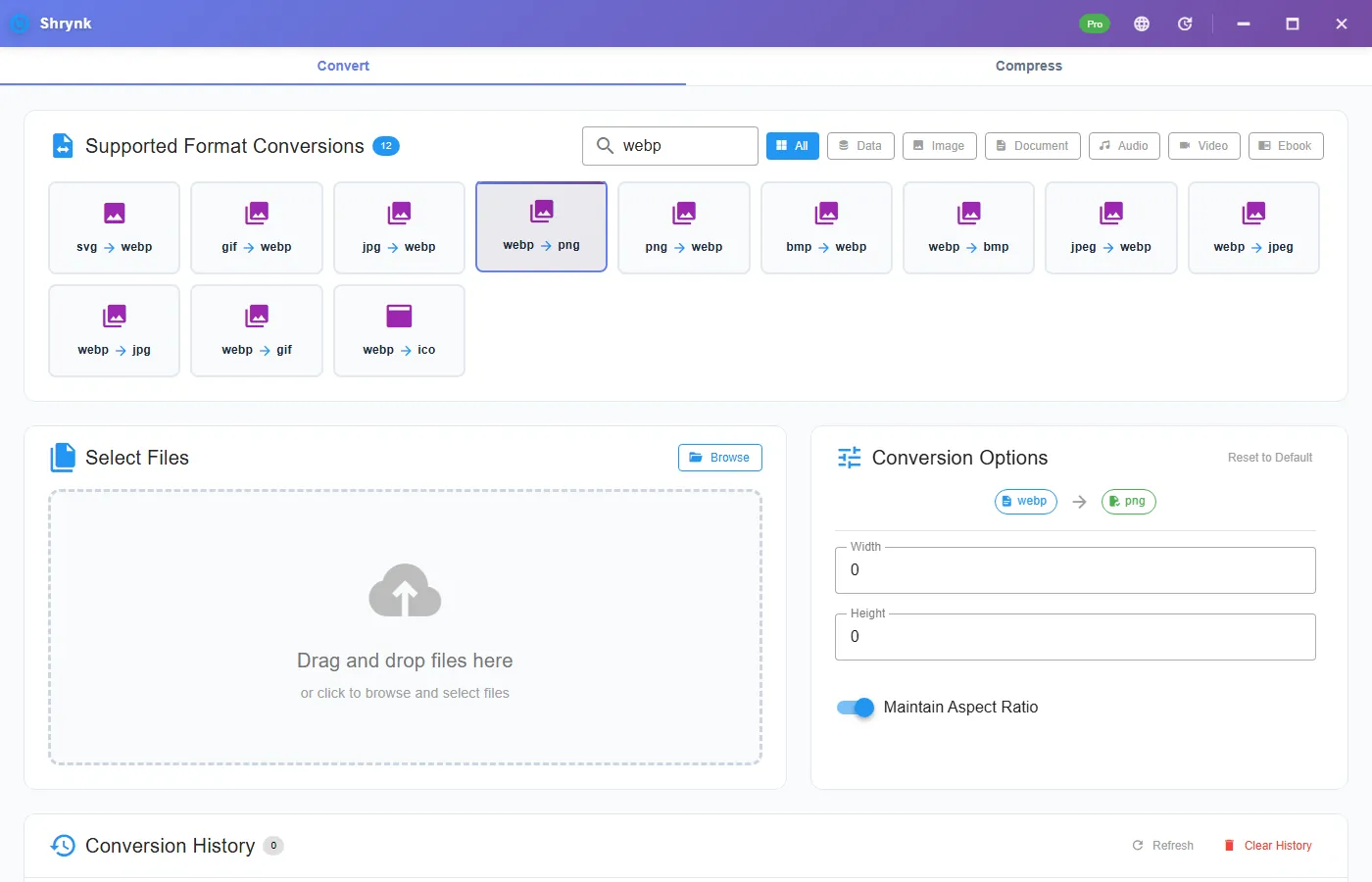
Options on webp → png
There is no quality slider. PNG is not JPEG. The panel shows:
- Width / height in pixels, 0 = keep the decoded size.
- Maintain aspect ratio (on by default). Set only width if a CMS caps the long edge.
Resizing is the only way this pair makes a smaller file on purpose. A 4000-px UI dump as PNG is still a PNG: large, sharp, and correct. Do not “compress” it by sending it through JPEG first.
Steps
- Install Shrynk. First run.
- Convert → search
webp→ webp → png. - Leave width/height at 0 unless a form also caps dimensions.
- Drop the file. Open the PNG at 100%. Check a letter edge and any transparent corner.
Free desktop = one file. A folder of Chrome “Save image as” is Pro batch, one pair: all WEBP→PNG. Do not mix photos you meant to JPEG into that run.
What “lossless” means here
PNG will not add blocking. It also will not invent detail the WEBP already threw away on a CDN. A mushy WhatsApp WEBP stays mushy; it just becomes a larger PNG. If you needed a print master, you needed the camera file, not this download.
Animated WEBP: one frame (usually the first). If you needed the loop, this converter is the wrong family. Video/GIF is a different card.
Why the PNG is bigger than the WEBP
That is the point of WEBP. A screenshot that was 180KB as WEBP can be 600KB–1.2MB as PNG. Keep the PNG when the destination is picky. Keep the WEBP when the destination already understands it (modern Chrome, most CDNs).
If the form also says “under 500KB,” resize the long edge (1600 or 1920) on this pair. Do not JPEG the screenshot to hit the cap.
Not HEIC, not a fake extension
Renaming .webp to .png is not a conversion. The decoder has to run. Explorer showing .heic is a different codec; this build has no HEIC path. Running the wrong pair is how people think the app is broken.
Failures that look like bugs
- Checkerboard became white in the other tool. You actually exported JPG last time, or the other tool flattened on import. Confirm the extension is
.pngand reopen here. - Only the first frame of a meme. Animated WEBP. Expected.
- CMS still says invalid. Some want a max edge, not a format. Set width and convert again from the WEBP.
What this will not do
- HEIC, RAW, or PSD.
- Browser-tab still-image convert. Desktop only.
- CMYK / ICC print profiles. Output is a normal sRGB-ish raster.
Check the PNG in two minutes
After convert, do not trust the thumbnail. Open the PNG in Photos, zoom to 100%, and look at (1) a letter edge, (2) a corner that should be transparent. Put the PNG on a dark slide in PowerPoint or a black <body>. If you see a white rectangle, you exported JPG last time or the WEBP never had alpha. If the letters shimmer, you used webp → jpg on a screenshot.
Chrome “Save image as” sometimes still offers WEBP even when the page looks like a PNG. Explorer’s Type column should say WEBP or “WebP file.” If it already says PNG, you are done; running this pair again is a no-op encode that only wastes a click.
A 1200-wide UI WEBP at ~80KB becoming a 400–900KB PNG is the usual trade. A 12 MP photo WEBP becoming a 15MB PNG means you picked the wrong target — that photo wanted JPEG. Keep both files until you have opened the PNG once. Shrynk does not delete the WEBP.
Animated marketing WEBP from an ad network: first frame only, often a poster or a blank. If the first frame is empty, you will think the converter is broken. Open the WEBP in a browser and pause on frame one before you file a bug.
Folder of mixed Chrome saves: sort photos vs UI first. Pro batch is one mapping. A Downloads pile that is half photos should not all go to PNG or you will mail 40MB zip files for no reason. Privacy is local either way — see local files.
Outlook, Slack, and “PNG only” uploaders
Older Outlook desktop still shows a blank tile for WEBP attachments. A PNG of a screenshot goes through. Slack workspace icons and many government uploaders list PNG/JPG and silently drop WEBP. If they also cap 500KB, resize the long edge on this pair before you argue with the form. Do not JPEG a UI shot to hit the cap — that is the other article.
Print shops that say “PNG or TIFF” mean a flattened, sized raster, not a 4 px viewBox leftover. Check Properties after convert. If the PNG is 24×24, you started from a tiny WEBP (or an icon). Ask for the original asset. We cannot invent megapixels.
Windows Photos can Save As PNG one file at a time and will overwrite if you are sloppy. Shrynk writes a sibling file. For 40 Chrome saves, that difference is the product. Free lets you test one. Pro is $9 once for the folder. The box on this page is one still; Compress on the homepage is still video-only. Free vs Pro.
FAQ
Is WEBP to PNG lossless?
No JPEG ringing. You keep what the WEBP stored, including alpha. You do not recover CDN quantization.
PNG or JPG?
PNG for UI and alpha. JPG for photos — that guide.
Can I batch a Downloads folder?
Pro, one mapping. Batch jobs.
Convert WEBP on the PC: download Shrynk.