Convert PNG to JPG Only When the Form Forces JPEG
PNG is the right file for a screenshot and a terrible file for a 12 MP photo you will email. People search “PNG to JPG” for two jobs that should not share a setting: (1) a camera PNG or a WhatsApp export that must become JPEG, and (2) a UI capture that a government form will not accept as PNG. The second job will look worse. Do it anyway only if the form wins.
Shrynk’s desktop image converter is local (pure Go). JPEG and JPG are the same codec on this mesh. One PNG can also convert in this tab — canvas, no upload. JPEG flattens transparency to white. A folder or a file over about 25MB belongs in the Windows app.
Decide before you touch quality
| PNG content | Convert to JPG? | Note |
|---|---|---|
| Photo, product shot, landscape | Yes, 80–90 | PNG is wasted weight. |
| Screenshot / terminal / slides | Only if required | Expect dirty type. Keep a PNG copy. |
| Logo with transparency | No | You get a filled box. Use PNG or ICO. |
| Icon you will put in a .ico | No | PNG to ICO instead. |
Going the other way — a JPEG that a tool wants as PNG — is JPG to PNG. That does not undo this encode.
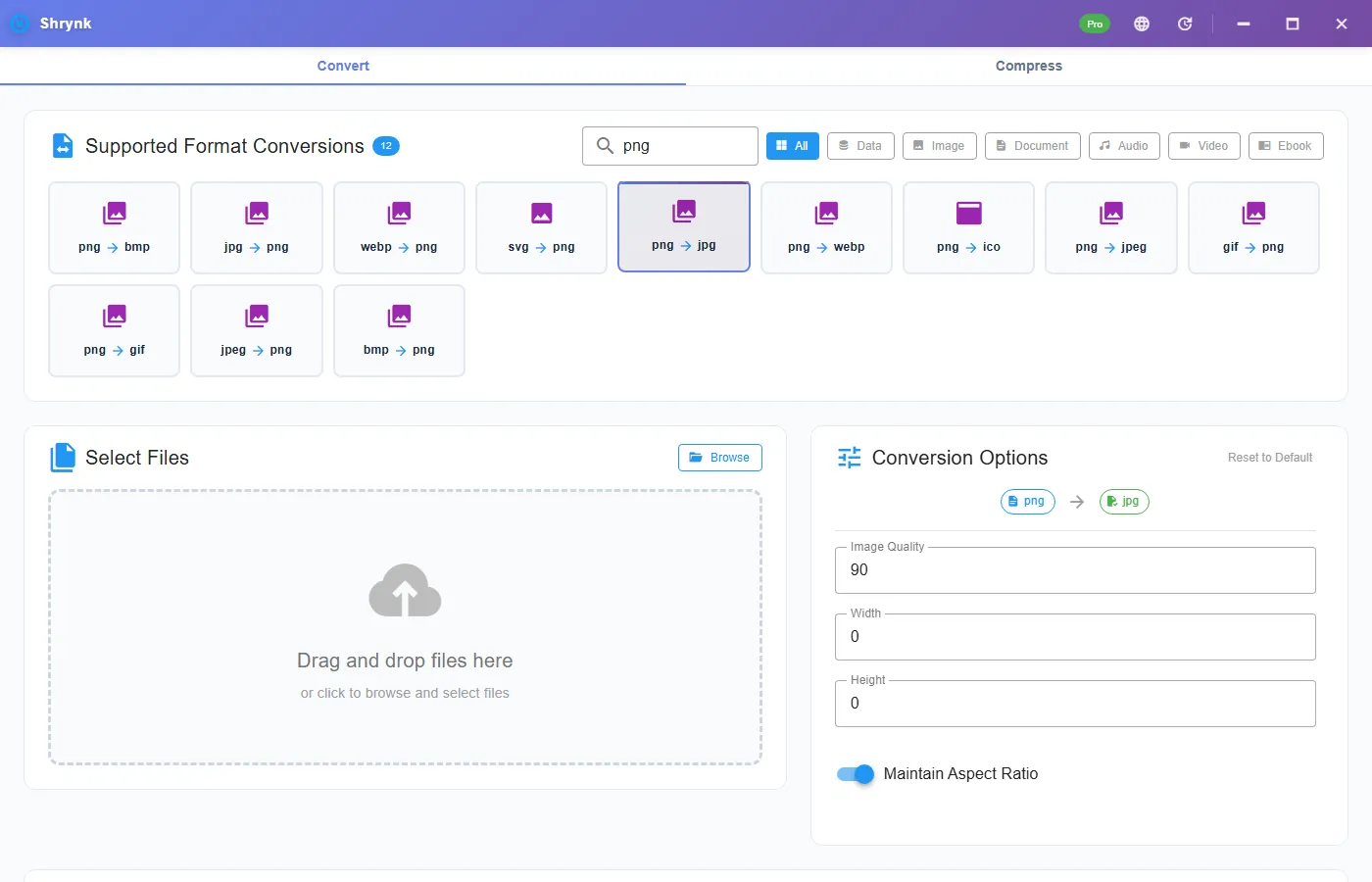
Real options on png → jpg
- Quality 1–100, default 90. This is JPEG quality, not a PNG compression level.
- Width / height, 0 = keep pixels. Maintain aspect ratio on by default.
There is no “keep transparency” checkbox. JPEG cannot. If you needed a hole, you picked the wrong card.
Steps
- Install Shrynk.
- Convert → search
png→ png → jpg (or jpeg). - Photos: 80–90. Forced screenshot: stay at 90 and keep the original PNG.
- If the form also says “under 2MB,” set a max width (1920) and quality 80. Resize does more than dropping 90→85.
- Open the JPG at 100% on a face or a line of UI text. Banding? Raise quality and run again from the PNG, never from the first JPG.
Never PNG→JPG→JPG. Each pass adds blocking. Free = one file. Folder = Pro, one mapping. First run.
What happens to the transparent pixels
They become opaque. The usual result is a white or near-white rectangle around a logo that used to float. That is the format, not a Shrynk bug. If a client sent a transparent PNG for a slide, do not JPEG it “to make email smaller.” Send the PNG or a PDF.
Paint’s Save As does the same flatten and will happily overwrite. Shrynk writes a new file.
Quality 90 vs 80 vs 70
- 90–100: archive / print-adjacent. File stays large.
- 80–85: mail, CMS, a slide with a photo.
- 70 and below: thumbnails. Sky and hair fall apart. Do not use on a screenshot you will read.
A 4K screenshot at quality 90 can still miss a 2MB cap. Width cap first, then quality.
Failures that look like bugs
- White box around the mark. You flattened alpha. Stay on PNG.
- Text looks dirty. Expected on UI. The form required JPEG; keep the PNG for yourself.
- Form still rejects. Some want
.jpegnot.jpg, or a dimension cap. Check KB and pixels.
What this will not do
- HEIC. Wrong codec.
- Browser still-image convert.
- CMYK for a print shop RIP.
Check the JPG the way a form will
After the run, look at three numbers: extension (.jpg vs .jpeg), kilobytes, and pixels (right-click → Properties). Forms that say “JPEG under 2MB, longest side 2000” fail on the number they named, not on “you used Shrynk.” Set width to 2000 and quality 80, convert again from the PNG.
A 1920×1080 screenshot PNG is often 400KB–1.5MB. The JPG at 90 may be 200–400KB and look dirty on the font. That dirt is JPEG. If the form allows PNG, stop. If it does not, send the JPG and keep the PNG on disk. Do not “clean it up” by opening in Paint and saving again.
WhatsApp and some phones export photos as PNG for no good reason. Those files are the ones this pair is for. A 12 MP PNG photo at quality 80–85 and width 1920 is a normal email. The same settings on a terminal screenshot is a last resort.
Batch: one quality for the whole folder. If you mix screenshots and photos, pick 90 and accept fat photo JPGs, or split the folder. Free is still one file so you can test the worst screenshot before you pay $9 for Pro. The site compressor will not take the PNG.
HEIC in the same camera roll is a different extension. This pair will not open it. Do not rename .heic to .png and hope. Product matrix: supported formats.
Paint vs Shrynk vs “just change the extension”
Renaming .png to .jpg leaves PNG bits in a lying name. Uploaders that sniff magic bytes will reject it. Paint’s Save As does a real JPEG and often overwrites. Shrynk writes a new JPG, keeps the PNG, and applies one quality and one max edge to a folder if you have Pro. That is the whole difference.
A client logo PNG at 90 will look acceptable as a tiny email thumbnail and wrong on a projector. If the slide is the deliverable, keep PNG. If the portal only has a JPEG field, 90 + keep size, and tell them the mark used to have a hole. Screenshot of a spreadsheet: JPEG will smear the grid. Push back on the form if you can; if you cannot, 90 and a width cap so the file actually uploads.
iPhone screenshots are PNG. Those are the files people JPEG by habit. Resist unless the destination forbids PNG. Camera photos saved as PNG by a bad exporter are the files you should JPEG. Sort the folder by “looks like a photo” vs “looks like a window.” Two batches, two qualities. Free vs Pro.
A 4K screenshot at quality 70 looks like a smeared spreadsheet. If the portal also wants “under 1MB,” width 1600 + quality 85 from the PNG is the experiment that usually works. Write down the two numbers that uploaded. Next time you do not guess. Re-run from the PNG, never from the rejected JPG.
FAQ
Will transparency survive?
No. JPEG has no alpha.
Default quality?
90. Use 80–85 for mail. Do not recompress.
Whole folder of exports?
Pro, one pair. Do not mix screenshots and photos if you care. Format matrix.
Download Shrynk — local, one file free.