Convert PNG to ICO for a Favicon or a Windows Shortcut
Windows shortcuts, some installers, and older “favicon.ico in the site root” setups still want a real .ico, not a PNG you renamed. An ICO is a container that can hold several square bitmaps. Shrynk builds that from a raster. It is not an App Store screenshot pack and it will not invent a 16-px mark from a busy photograph.
Cards: png / jpeg / jpg / bmp / webp / gif → ico. Vector source: svg → ico on the SVG converter (width, height, background). This page is the PNG path because that is the phrase people type after they exported a logo from Figma.
Start from a mark, not a photo
| Source | Use as ICO? | Why |
|---|---|---|
| Simple logo, high-contrast, already square | Yes | 16 and 32 stay readable. |
| Transparent PNG of the mark | Yes | Keep alpha. Do not JPEG it first. |
| A 1024 marketing render with tiny type | No | 16-px layer is noise. Redesign the small size. |
| A selfie or product photo | No | Looks like a stamp, not an icon. |
If you still have the SVG, prefer SVG to PNG at a known size, then ICO — or svg → ico directly. Scaling a mushy 64-px PNG up to 256 does not add lines.
The sizes option
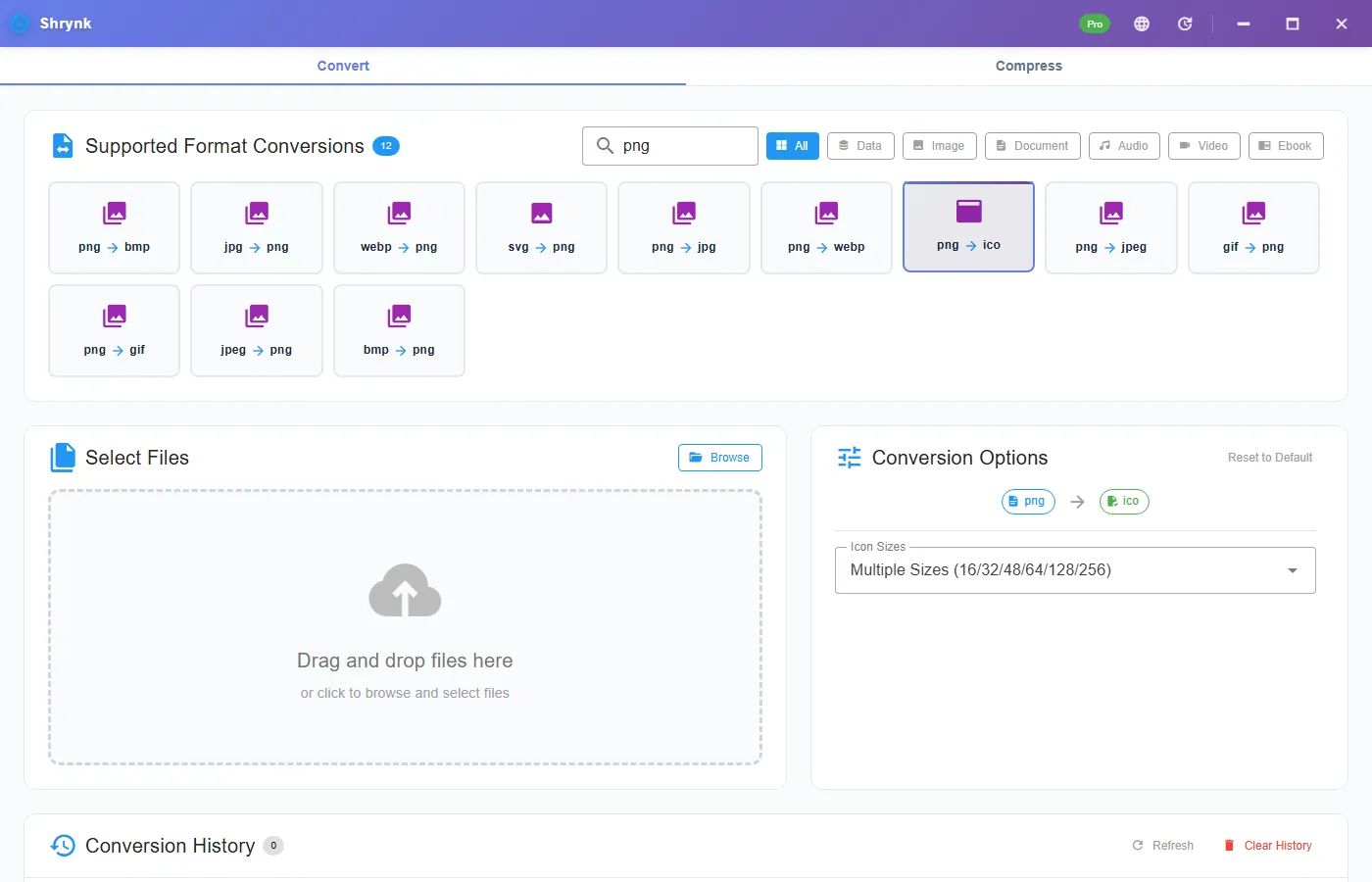
One control: sizes = 16 / 32 / 48 / 64 / 128 / 256 / multi (default). Multi packs several resolutions into one ICO so Explorer and browsers can pick. A single 32 is enough for a dead-simple favicon. Use 256 if you care about large Windows tiles.
There is no quality slider on this pair. You are not JPEG-encoding the icon.
Steps
- Export a square PNG. Pad the canvas if the mark is wide. Do not stretch.
- Install Shrynk.
- Convert → png → ico. JPG sources use
jpg → ico— same sizes list, but JPEG already flattened any hole. - Leave multi. Drop the PNG. Open the ICO in Explorer (thumbnail) and, if you have one, an ICO viewer at 16 px.
- For a website: put
favicon.icoat the site root or point a<link rel="icon">at it. Modern sites can also serve a PNG favicon; ICO is the compatibility file.
Free = one file. A folder of brand variants is Pro. The browser stills preview does not write ICO. First run.
JPG to ICO and WEBP to ICO
Same sizes control. JPEG sources cannot keep a transparent hole — you get a solid rectangle in the small layers. Convert a transparent PNG, not a JPG you made “to be smaller.” WEBP works if it still has alpha; if it was a photo WEBP, you are back to the selfie problem.
Failures that look like bugs
- Fuzzy 16-px tab icon. The source had thin strokes. Draw a 16-px version; do not trust downscale of hairlines.
- White box. Source was JPEG or a flattened PNG. Use a real alpha PNG.
- Windows still shows the old shortcut icon. Explorer caches icons. The file can be fine. Change the shortcut target or rebuild the cache — that is Windows, not a failed convert.
What this will not do
- Android adaptive icons, iOS App Store stacks, or .icns for macOS.
- An entire PWA icon set (192/512 PNG). Use PNG exports for those.
- ICO → PNG unpack in this article’s pair (we create ICO, we do not advertise a reverse unpacker here).
Favicon vs shortcut vs store listing
A website favicon can be a 32-px ICO, a multi ICO, or a PNG linked in HTML. Windows 10/11 shortcut overlays look better if 256 is in the file — that is why default multi exists. An Apple or Google Play listing is not ICO. Those want PNG/JPEG at sizes they publish. Do not send an ICO to App Store Connect.
Source size: start from at least 256×256 PNG if you want a clean 256 layer. A 64-px export scaled up is soft. Figma: export @1x at 256 or 512, transparent, then this pair. Do not export @4x of a 16-px frame and call it 64 — check the actual pixels in Explorer.
After convert, set a test shortcut’s icon (Properties → Change Icon → browse to the ICO). If you still see the old picture, you are looking at Explorer’s cache. The file can be correct. Copy the ICO to a new name and point the shortcut at that to force a refresh.
Batch: a folder of brand marks at different aspect ratios will all become square-ish icons. Wide wordmarks die at 16 px. Split “app mark” vs “wordmark lockup” and only ICO the mark. Pro will happily ICO the wordmarks; they will still be unreadable. Batch does not crop for you.
SVG sitting next to the PNG: if the PNG is a flattened export with a white box, go back to the SVG and use svg → png with transparent background, then ico — or svg → ico. Two rasters from a dirty PNG will not restore the hole.
HTML favicon that still works in 2012 browsers
Modern Chrome is happy with a PNG <link rel="icon" type="image/png">. IE and some intranet appliances still request /favicon.ico. Put the ICO at the site root even if you also ship PNG/SVG icons. One multi ICO covers that request. You do not need a separate 16-only file unless a dinosaur CMS asks for it.
Installer projects (Inno, MSI): point the icon resource at the ICO you just made. If the installer UI looks soft, you shipped a 32-only ICO. Rebuild with multi or 256 from a 256+ PNG. Do not upscale a 16-px source and hope the installer magically sharpens.
Security: an ICO is just images. It is not a signed binary. Hosting a favicon does not require Pro. Converting a folder of client marks locally is why the desktop app exists — do not drop logos on a random “png to ico” website. Local files.
If the PNG is a photo of a storefront, stop. Draw a mark. This pair will produce a technically valid ICO of a muddy photograph. That is a successful convert and a failed brand. The quality bar on this site is: we tell you when the format succeeded and the job still failed.
FAQ
Favicon size?
Default multi. Single 32 if you only need a tab icon.
JPG source?
Works, loses alpha. Prefer PNG.
Have SVG instead?
SVG to PNG or svg → ico. Matrix: formats.