Convert SVG to PNG at the Pixel Size the Form Asked For
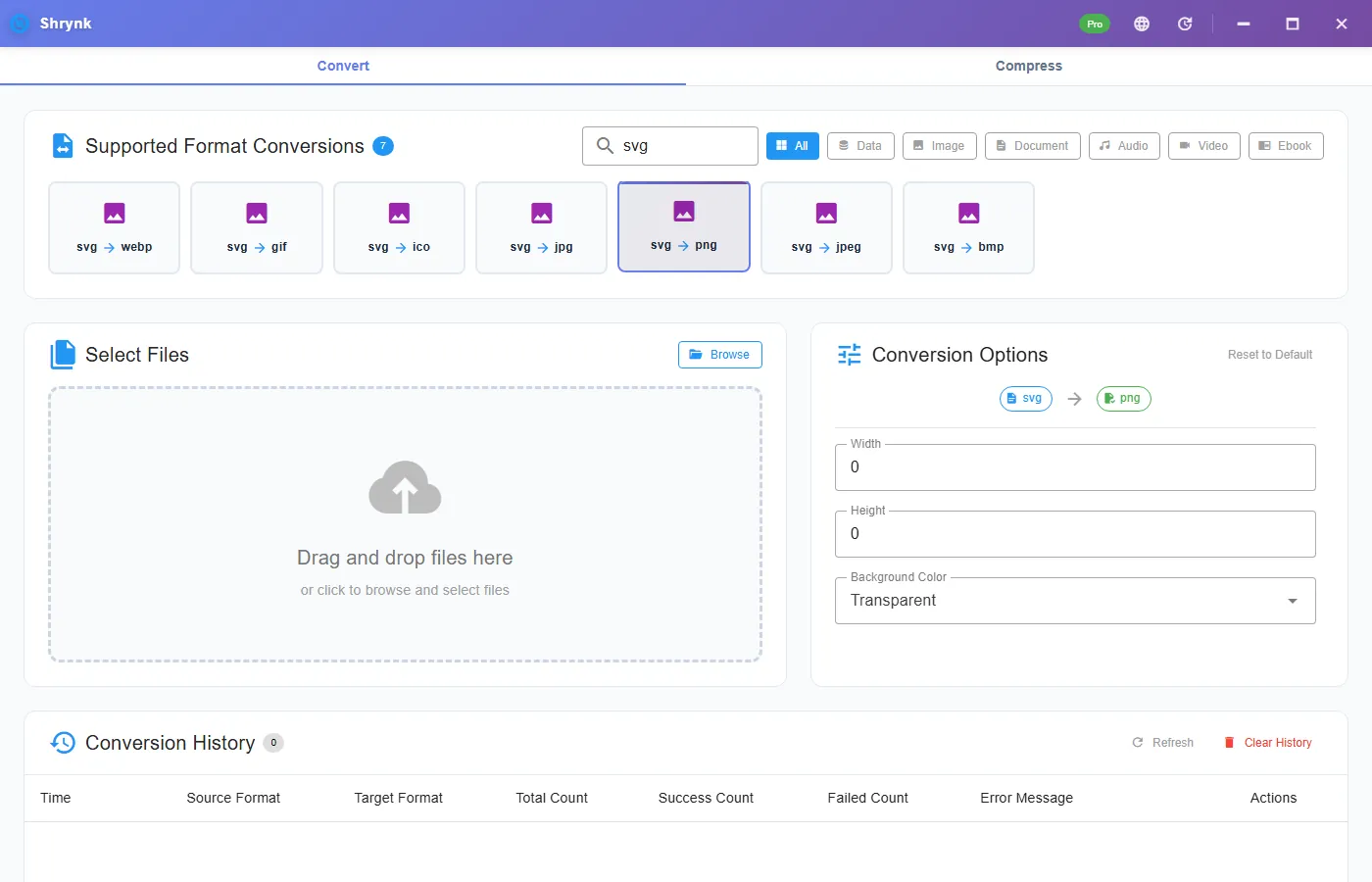
SVG is math. PNG is pixels. Uploaders, email, Word, and most social boxes want pixels. “SVG to PNG” means pick a width in pixels and rasterize. If you leave size at 0, Shrynk uses the file’s own viewBox / stated size — which might be 24 or 2400 depending on who exported it. Always check the output dimensions before you send.
Targets on the desktop converter: svg → png, jpeg, jpg, bmp, webp, gif, ico. This article is PNG (and when to use JPG). Icons: see PNG to ICO if you already have a PNG. One SVG can also rasterize in this tab. That uses the browser’s SVG engine; desktop uses oksvg — filters and fonts can differ.
PNG vs JPG from a vector
| Target | Background default | Use when |
|---|---|---|
| PNG | transparent | Logo, UI, anything that must float on a slide. |
| JPG / JPEG | You should set white or black | A photo-like illustration a form said JPEG-only. JPEG has no hole. |
| WEBP | transparent available | A modern web asset. Old Outlook may still choke — then PNG or JPG. |
| ICO | same background list | Favicon from the vector, if the mark is simple. |
Width, height, background
- Width / height 0–10000. 0 = do not override (use the SVG’s size). Set 512, 1024, or 2048 when a store listing says so.
- Background transparent (default) / white / black.
For PNG logos leave transparent. For JPG, set white unless the brand is on black. A “transparent JPEG” is a myth; you will get a filled rectangle.
Steps
- In Figma/Illustrator, outline fonts if the PC will not have that typeface. Flatten effects you care about.
- Install Shrynk.
- Convert → search
svg→ svg → png. - Set width to the required long edge. Leave height 0 if you want aspect locked by the rasterizer’s size math — or set both when the spec is a square (1024×1024).
- Open the PNG at 100%. Check a curve and a letter. Jagged? Raise width and run again from the SVG, not from the first PNG.
Free = one file. A folder of icon SVGs is Pro, one mapping (all svg→png at the same width). First run.
This is not Chrome
The rasterizer (oksvg) understands a large chunk of SVG 1.1. It is not a headless browser. External font files, some filters, masks, <script>, and images linked with href can vanish or simplify. If the preview in the browser looks perfect and the PNG is empty, outline text and embed or skip the linked bitmap. That is the usual “bug.”
SVGZ (gzip SVG) is not the same as .svg. Use a plain SVG file.
svg → jpg when they said JPEG
Same width/height. Set background to white. You still cannot recover a vector later from that JPG. Keep the SVG as the master. Do not SVG→JPG→PNG to “add transparency back.”
Failures that look like bugs
- 24×24 output. Width was 0 and the SVG said 24. Set 1024.
- Missing wordmark. Fonts not outlined / not installed.
- Black box. You targeted JPG with transparent default filling oddly, or the SVG used a blend the rasterizer skipped. Try PNG + white background to isolate.
What this will not do
- PDF or EPS from SVG.
- A full Chromium render of CSS-in-SVG experiments.
- HEIC or “vector to Word.”
Pick the pixel number on purpose
Common targets: 512 (PWA icon), 1024 (many store slots), 2048 (print-adjacent raster). 10000 is the panel max — do not set it “for quality” on a simple logo; you will get a 40MB PNG of a mark that was three paths. For a website <img>, 2× the CSS width is enough (a 320-wide logo slot → 640 PNG).
After convert, right-click the PNG → Properties and read width. If it is 24, your SVG was a 24-unit icon and width was 0. That is the usual “why is it blurry on my hero.” Set 1024 and run again from the SVG.
Text: convert to outlines in the design tool if the Windows machine does not have the font. A missing font becomes a fallback or empty glyphs — people call that a broken converter. It is a missing face. Emoji and webfonts linked from the SVG will not download during rasterize.
Filters and blur: a soft shadow that looks fine in Chrome may clip or vanish. If the shadow is brand-critical, flatten that effect to a bitmap in Figma and nest it, or accept a simpler SVG. This is not a Chromium print path.
Folder of icons: set one width for the whole Pro batch. Do not mix 24-px system icons and 1024-px logos in the same run unless you want them all forced to the same pixel width. Sort first. Browser compress still will not take SVG. Local only.
Pick a pixel number on purpose
Store listings: 512 or 1024 is common. A slide hero: 1920 wide. A favicon pipeline: 256, then ICO. Width 0 is only correct when you already opened the SVG in a browser, inspected the bounding box, and liked that number. A Figma “export SVG” of a 24-px icon is 24 unless you set width here.
Max is 10000. A 10000-px PNG of a simple logo is a joke file. 2048 is enough for print-adjacent raster of a mark. If a printer asked for 300 dpi on a 3-inch logo, that is 900 px, not 8000. Do the inch × dpi math once.
Check: after convert, Properties should show the width you typed. If you typed 1024 and got 24, you targeted a different card or an old output file. If you got 1024×something-not-square on a mark you thought was square, the viewBox was not square — pad in the design tool, do not stretch height independently unless you mean to.
Fonts: “Convert to outlines” in Illustrator / “Outline stroke” + flatten text in Figma. If the PNG is missing a word and the SVG preview in Chrome shows it, the PC running Shrynk does not have that font. Outlines travel. We do not bundle your licensed typeface into the rasterizer.
Linked image href="https://..." inside the SVG will not fetch on a locked-down machine. Embed the bitmap or drop it. Scripts in SVG are ignored. That is a feature for a local converter. Nothing is uploaded, including those hrefs.
FAQ
Width 0?
Use the SVG’s own size. Set a number when a form names one (max 10000).
Need ICO?
svg → ico here, or PNG then png → ico.
Blank PNG?
Outline fonts, simplify filters. Format notes.