Convert JPG to PNG When a Tool Refuses JPEG — Not to “Fix” the Photo
Search logs are full of “JPG to PNG” from people who think PNG will sharpen a downloaded JPEG. It will not. PNG is a lossless container for the pixels you already have. Those pixels already include JPEG blocking. The new file is usually two to eight times larger and looks the same at 100%.
The valid reasons: a game engine, a printer form, or an editor that only imports PNG; or you are about to erase a background and need a format that can store alpha after you paint it. Shrynk will not invent the alpha for you. A JPEG is already flat. One file can convert in this tab (canvas, no upload). That still will not restore JPEG blocking.
When this pair is the job
| Situation | Do it? | Expect |
|---|---|---|
| Unity / Godot / a CMS “PNG only” | Yes | Same picture, bigger file. |
| You will cut out a subject next | Yes, then edit | PNG can hold the hole you create later. |
| You want the photo to look better | No | Need the camera original or a better encode, not this pair. |
| You want a smaller file | No | Stay on JPEG or use WEBP. See the reverse. |
Options: resize only
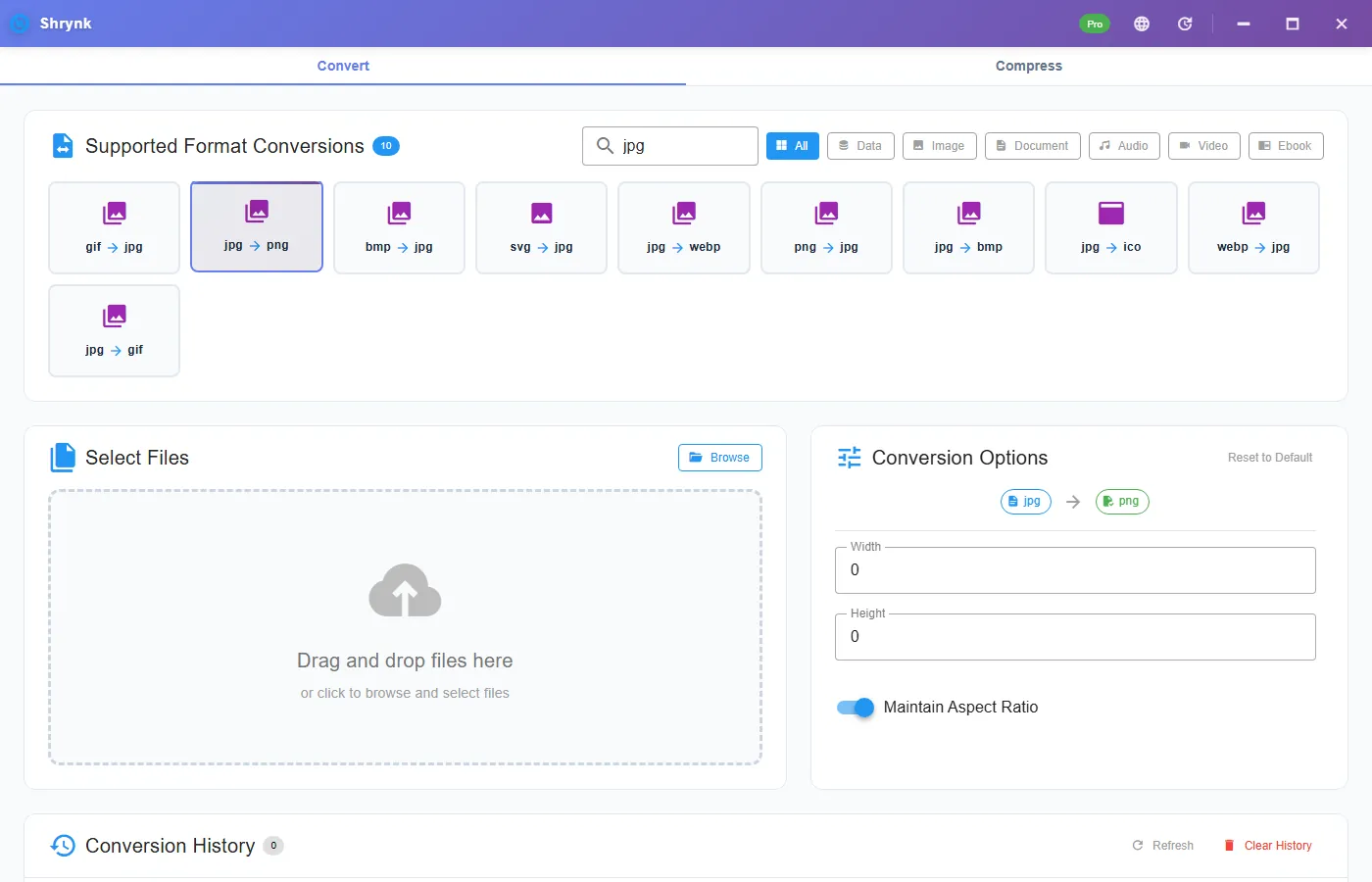
jpg → png and jpeg → png show width / height (0 = keep) and maintain aspect ratio. There is no quality number. PNG encoding here is not a JPEG quality clone.
If the destination also caps pixels (1024-wide avatar), set width here. Do not JPEG it again after.
Steps
- Install Shrynk. First run.
- Convert → search
jpg→ jpg → png. - Leave size at 0 unless you must downscale.
- Drop one JPEG. Compare file sizes in the result row. The PNG should be larger. If it is not, you may have started from a tiny thumbnail — check the pixel dimensions.
- Open both at 100%. The blocking on a sky gradient will still be there. That is the proof this is not a restore.
Free = one file. A camera-roll batch to PNG is legal in Pro and usually a bad idea: you will fill a disk with no visual win. Prefer WEBP or stay on JPEG for archives.
Why the file balloons
JPEG throws away coefficients. PNG then stores the remaining noisy pixels without that cheap transform. A 2MB phone JPEG becoming 12MB PNG is normal. If a form said “PNG under 5MB,” resize the long edge first (1600–1920), then convert. Do not JPEG-compress to hit the cap and then PNG that result — you pay both taxes.
Transparency you hoped would appear
A white studio backdrop in a JPEG is white pixels, not alpha. Converting to PNG keeps the white. To get a hole you must mask in an editor after. This converter does not run a cutout model.
Failures that look like bugs
- “It’s blurrier.” You are looking at a different zoom or a viewer that scales. Compare 100%. The encode did not sharpen or blur on purpose.
- Picky engine still rejects. Some want 8-bit, no gamma chunk, or a max size. Check pixels and KB, not just the extension.
- You used the website compressor. That path is video. Desktop Convert only for stills.
What this will not do
- Un-JPEG / AI enhance / deblock.
- HEIC. Different article, and this build cannot.
- CMYK or spot colors.
A before/after you can measure
Take a 2MB, 4000-px-wide phone JPEG. Convert with width 0. Expect a PNG in the 8–20MB range. Dimensions should match the JPEG. Open both at 100% on a sky or a wall. The 8×8 blocking is identical. If someone tells you the PNG is “higher resolution,” they are reading file size, not pixels.
Now convert the same JPEG with width 1024. The PNG should be 1024 pixels wide (height follows if aspect is on) and much smaller than the 4000-px PNG, still larger than a 1024-wide JPEG would have been. That 1024 PNG is what a “PNG only, under 5MB” avatar form actually wanted — not a 20MB dump.
Game engines that reject JPEG often also reject odd sizes. Some want power-of-two. This converter will not pad to 1024×1024 for you. Export square in the editor or accept a non-POT PNG if the engine allows it. We do not add a “pad canvas” toggle on jpg → png.
Do not run JPG→PNG→JPG to “refresh” a download. You will JPEG the blocking. If you needed a smaller JPEG, stay on JPEG and use a real encode from the camera file. If you needed WEBP for the web, that is a different card on the same image mesh — not a reason to visit PNG first.
Batching a year of JPEGs to PNG is how laptops die. Pro will do it. The quality standard for this site is: do not recommend that as an archive strategy. Archive the JPEG or the camera original. PNG here is a compatibility shim. Batch is for when a pipeline truly wants a folder of PNG.
Tools that say PNG and mean something else
Some “PNG only” engines also want 8-bit, no 16-bit, sRGB, and a max of 2048. This converter writes a normal 8-bit-style raster PNG from the decoded JPEG. It does not strip every ancillary chunk or guarantee a specific filter. If an engine still rejects, check their pixel cap and color mode, then resize here and try once more from the JPEG.
Designers convert JPG to PNG to “prepare a cutout.” Fine — then they still have to mask. The PNG does not start with alpha. A magic-wand in an editor is a second product. Do not expect Shrynk to return a sticker.
Web performance: serving a PNG of a photo is how pages crawl. If you converted so a CMS would accept the file, ask whether the CMS can take JPEG after all. If you converted so you could edit, keep the PNG as a working file and export JPEG/WEBP for the live site. This pair is a door, not an archive format for photographs. How conversion works.
Word and PowerPoint will import JPEG. You do not need PNG for a slide photo. You need PNG for a logo you will place on a colored shape. If the logo is already a JPEG with a white box, this pair will not remove the box. Cut it in an editor after, or go find the SVG.
FAQ
Does this improve quality?
No. Larger file, same decoded pixels.
JPEG vs JPG card?
Same path. Pick either.
Need a smaller photo instead?
Do not come here. Stay JPEG or read PNG to JPG if you started from PNG. Matrix: supported formats.