Convert JSON to CSV When Excel Is the Next Stop
An API dump is JSON. A human who lives in Excel wants rows. “JSON to CSV” only works if the JSON is tabular enough: a list of same-shaped objects. A deeply nested GraphQL tree is not a spreadsheet. Shrynk will not invent a star schema. It will flatten what it can and stuff the rest into cells as JSON text.
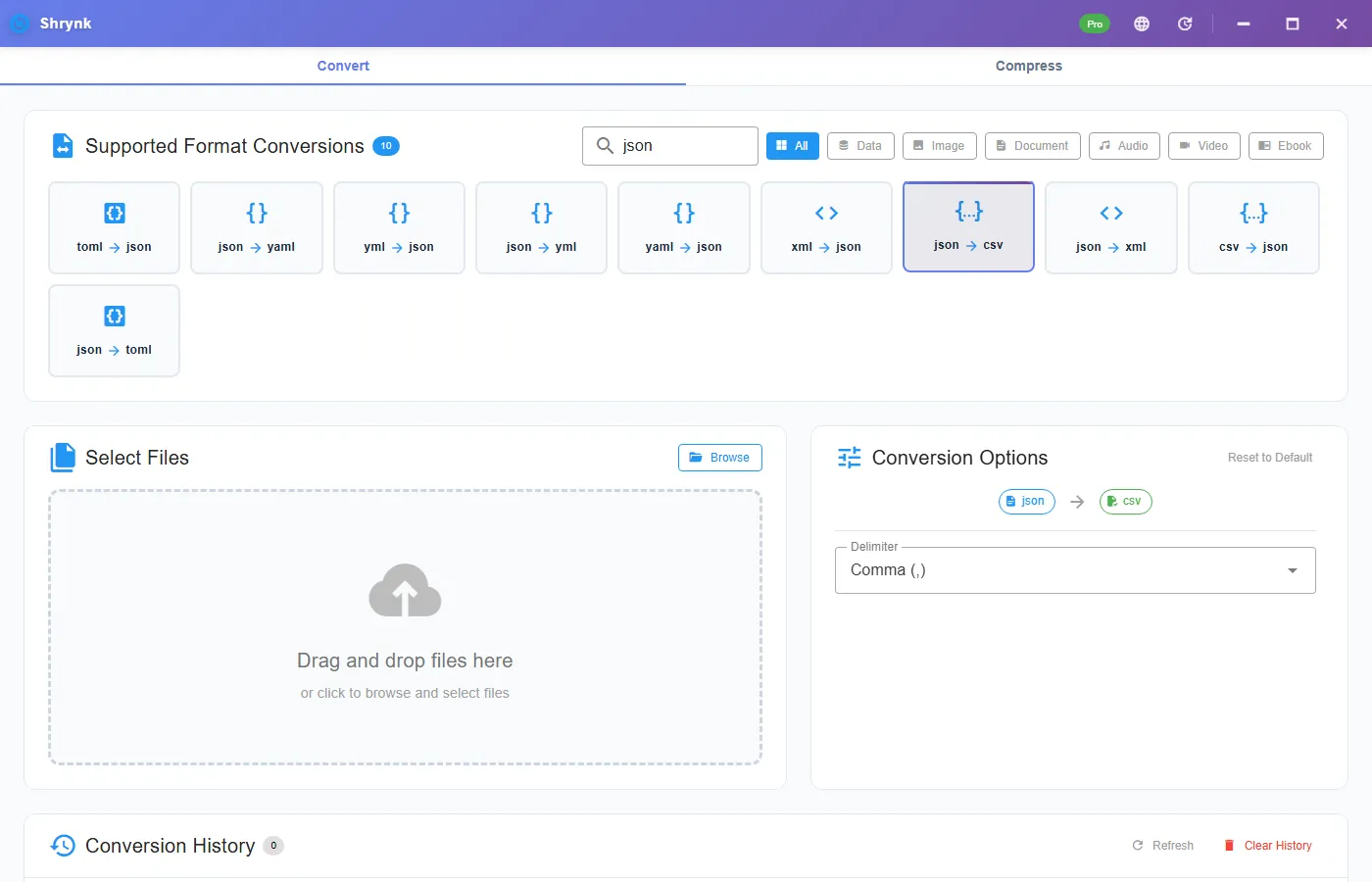
Pairs: json → csv (delimiter option) and csv → json (header row becomes keys). YAML and XML are other cards — XML to JSON.
Shapes that work
| JSON | CSV result |
|---|---|
[{...},{...}] | One row per object. Columns = sorted union of keys. |
{"data":[...]} (also records, results, rows, items, structure) | Uses that array if it is objects. |
| Another key that happens to be an array of objects | First such key in sorted order if no priority name matched. |
A single {...} with no array | One row. |
A primitive array [1,2,3] | Rows with a value column. |
| Invalid JSON / empty array of objects | Error. Fix the file; do not rename .txt to .json. |
Nested objects and arrays are not exploded into dotted columns. They are json.Marshal’d into the cell. Excel will show a string that starts with { or [. That is honest. If you needed address.city as its own column, flatten in code first.
Delimiter (JSON → CSV only)
Comma (default), semicolon, or tab. US Excel likes comma. Many EU Excels treat semicolon as the list separator — pick semicolon or you get one column of commas. Tab is TSV in a .csv name; say so to the next person.
CSV → JSON has no options. First row is keys. That is the contract.
A file you can check in one minute
Save this as check.json, convert with comma, open in a text editor (not only Excel, which may hide quotes):
[
  {"id": 1, "name": "Ada", "tags": ["a","b"]},
  {"id": 2, "name": "Bob", "city": "Oslo"}
]
You should see columns city, id, name, tags (sorted). Ada’s city empty. Bob’s tags empty. Ada’s tags look like ["a","b"] in one cell. If you get one column named value, you did not pass an array of objects.
Steps
- Install Shrynk.
- Convert → Data → json → csv.
- Pick delimiter for the human who will open it.
- Drop the file. If you get “no records” or “invalid JSON,” pretty-print the source in an editor and look for a trailing comma or a
{data:...}that is not actually an array.
Free = one file. Nightly API dumps: Pro, same delimiter every time. Do not mix EU and US delimiters in one folder. First run.
CSV back to JSON
Header row required. Duplicate headers will collide like any CSV library. Types are strings. A cell that contains JSON text stays a string unless you parse it later. This is not PostgreSQL COPY.
Failures that look like bugs
- One enormous column. You needed semicolon and used comma (or the reverse). Or the JSON was one escaped string.
- Lost nested fields. They are in a cell as JSON. Expand them yourself.
- Excel mojibake. Excel sometimes assumes ANSI. Open via Data → From Text and pick UTF-8. The CSV is UTF-8.
What this will not do
- Excel
.xlsx. Output is CSV. - Infer a schema, or XML (wrong card).
- Upload to a warehouse.
Excel, UTF-8, and the delimiter trap
Double-clicking a CSV on a German or French Windows often opens in Excel with every row in column A, because Excel expected ;. That is not a failed convert. Re-open via Data → From Text/CSV, set UTF-8 and comma — or convert again with semicolon. Do not “fix” it by replacing commas inside JSON cells; those commas are part of the nested string.
Headers are the sorted union of keys. Row 1 may have columns that only appear on row 500. That is correct. If you needed a stable schema, normalize the JSON first. We will not drop extra keys to match row 1.
A 200MB JSON array will produce a large CSV and can take a while. This is an in-memory-ish convert, not Spark. Split the dump if the machine starts to swap. A single 2GB GeoJSON of polygons is the wrong file: nested geometry will sit in one column as giant JSON strings and Excel will choke anyway.
csv → json: save Excel as CSV UTF-8 if you can. Excel’s default CSV can be ANSI and will mojibake names. If the JSON shows é, the CSV encoding was wrong before Shrynk saw it. Re-export UTF-8 and run again. We do not offer an encoding picker on this pair (that picker is on txt → txt).
API wrappers: if your file is {"status":200,"data":[...]}, the priority key data wins. If it is {"status":200,"payload":[...]}, we look at sorted keys and should still find the array of objects. If both data and errors are arrays of objects, data wins because it is in the priority list. That is the rule; it is not a GUI checkbox. Data pairs.
Excel, UTF-8, and the delimiter fight
After convert, open the CSV in Notepad first. You should see a header line and commas (or semicolons). If you see one long line of {, you converted a single object that was not tabular, or you opened the JSON. Then open Excel via Data → From Text/CSV, file origin UTF-8, delimiter matching the option you picked. Double-clicking a UTF-8 CSV on a Chinese/European Windows can mojibake names. That is Excel, not a bad convert.
Priority wrapper keys are data, records, results, rows, items, structure — in that order. An API that wraps the array in payload.users will not auto-find users unless it is the first array-of-objects in sorted key order. If the CSV is one row of metadata, the array is nested too deep. Flatten or move the array to the top level.
Column order is sorted A–Z, not the order keys appeared in the first object. Do not write a test that expects name before id. Downstream scripts should select by header name.
A 200MB JSON array will produce a large CSV and can take a while. This is not a streaming Spark job. For millions of rows, use a proper ETL. Free is one file so you can test a 20-row slice. Pro batch is for a folder of nightly dumps with the same shape, same delimiter. Mix a European semicolon dump with a US comma dump in one run and you will get garbage. Batch rules.
YAML configs and XML invoices do not belong on this card. YAML ↔ JSON has no delimiter. XML → JSON first, then CSV only if the JSON is a list of objects — two steps, two truths. XML guide.
FAQ
Which JSON works?
Array of objects, or a wrapper key like data / items.
Nested objects?
JSON text in the cell. Not dotted columns.
XML instead?
XML to JSON. Docs: data pairs.