Convert M4A to MP3: Voice Memos and iTunes Files Windows Will Play
iPhone Voice Memos, many podcast downloads, and old iTunes purchases land as .m4a. Cheap car stereos, some Windows apps, and a pile of “upload MP3” forms refuse that box. The file is already audio. You are not extracting a soundtrack from a movie — that is MP4 to MP3.
Shrynk’s audio mesh is all-to-all among MP3, AAC, FLAC, OGG, OPUS, M4A, WAV. This article is the head term (M4A→MP3). WAV→MP3, OGG→MP3, and FLAC→MP3 use the same bitrate panel. Search the extension you have.
M4A, AAC, and “it’s a video”
| Explorer shows | Card | Why people mix them up |
|---|---|---|
.m4a | m4a → mp3 | Voice memo / iTunes. |
.aac | aac → mp3 | Raw AAC, less common as a download. |
.mp4 / .mov with a picture | mp4 → mp3 extract | Same letters, different converter family. |
| ALAC inside M4A (Apple Lossless) | May still convert | You are going lossy. The “lossless” is gone after MP3. |
If VLC shows a video track, you have a video. Use extract. If it only shows audio, stay here.
Bitrate and sample rate (lossy targets)
- Bitrate 128k / 192k / 256k / 320k. Default 192k for MP3. OPUS as a target defaults to 128k.
- Sample rate 22050 / 44100 / 48000. Default 44100.
Going to WAV or FLAC drops the bitrate dropdown — those are not MP3. This page stays on MP3 because that is what the form asked for.
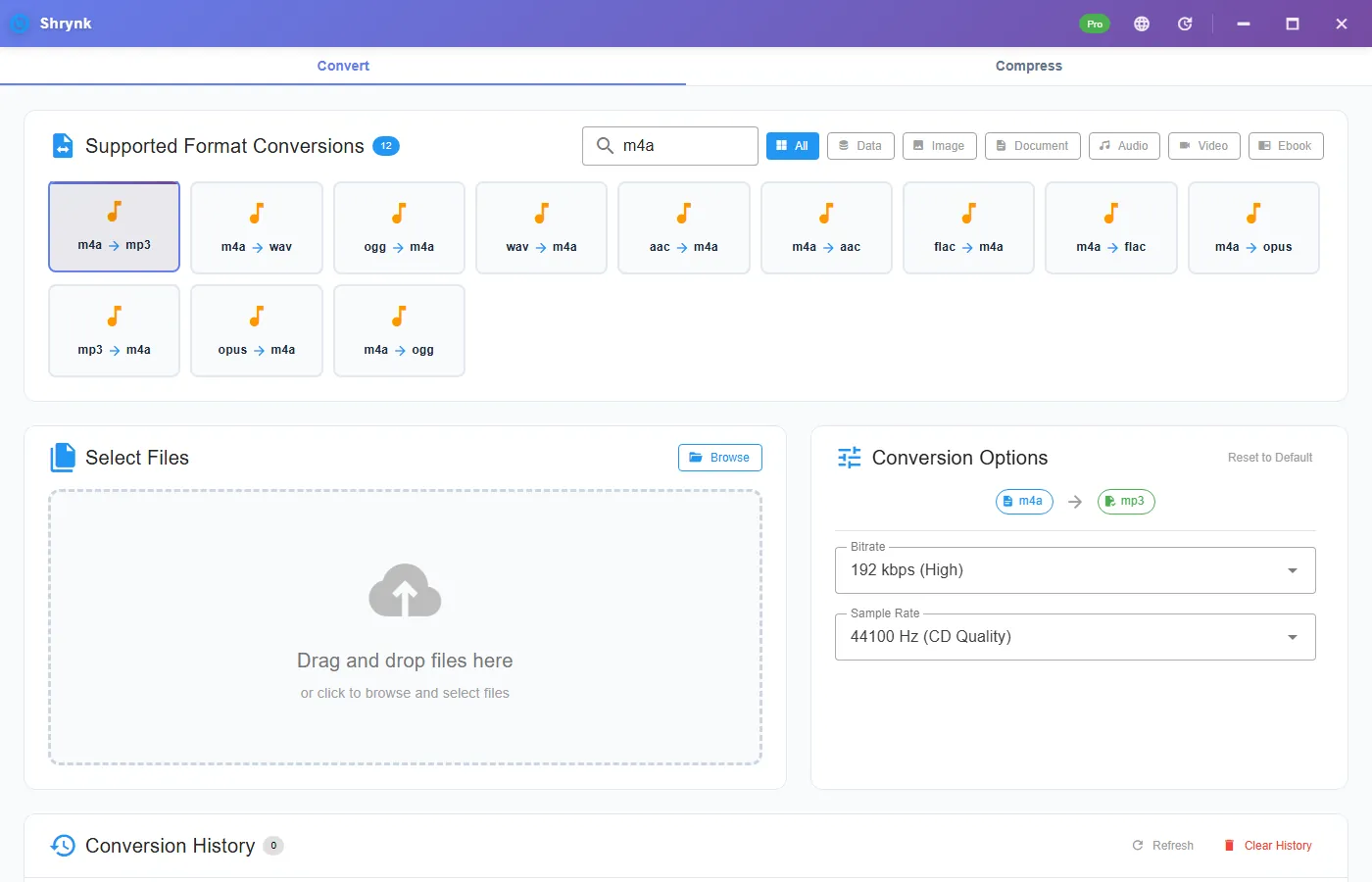
Steps for a Voice Memo
- Get the
.m4aonto the PC (Files app, cable, AirDrop to a share). Do not screen-record the memo. - Install Shrynk.
- Convert → Audio or search
m4a→ m4a → mp3. - Speech: 128k. Mixed music: leave 192k.
- Play the MP3. Check the first word and a quiet gap — clipped intros are how you notice a bad source, not a bad default.
The website compressor will not take M4A. Free = one file. A semester of memos is Pro batch, one mapping. First run.
WAV / FLAC / OGG → MP3 on the same mesh
A Zoom WAV dump and a Bandcamp FLAC are the same click pattern: source → mp3, 192k unless you have a reason. FLAC→MP3 is a one-way quality drop; keep the FLAC if you still own it. OGG from old games or recordings: 192k is plenty. Do not write a separate “workflow” for each pair — the panel does not change except OPUS defaults.
You cannot un-AAC a memo
Voice Memos are already lossy. 320k MP3 will not restore a room. If you need a DAW file, convert M4A→WAV instead (see MP3 to WAV for the uncompressed idea). For a car USB stick, MP3 at 128–192k is the job.
iTunes purchases with DRM will fail. We will not help strip FairPlay.
Failures that look like bugs
- Player says unsupported. You may have clicked m4a → aac or kept M4A. Confirm
.mp3. - Two hours became 20 seconds. Wrong file, or a video you treated as audio. Open the source duration in VLC first.
- Album art disappeared. This converter does not promise to copy tags and cover art. Re-tag if you care. The sound is the product.
What this will not do
- YouTube / URL rip.
- Extract from MP4 (wrong family).
- Normalize loudness or remove noise.
Voice Memo on a USB stick: a check you can do
A 12-minute Voice Memo M4A is often 3–8MB (AAC ~64–128k). At 128k MP3, expect a similar size, sometimes a bit larger because you re-encoded. At 320k it can double. If the MP3 is 200MB, you dropped a video named like a memo or a two-hour file. Check duration in Explorer details.
iPhone → Windows: AirDrop to a Mac then copy, or the Files app / a cable. Emailing the memo to yourself can re-encode in transit. Prefer a file copy, then one Shrynk pass. Two cloud transcodes plus 128k MP3 is how consonants disappear.
iTunes “Purchased” M4A with a lock icon is DRM. The convert will error. That is the license, not a missing codec. Voice Memos you recorded, Zoom M4A exports, and podcasts you are allowed to keep are the intended inputs.
Car USB: FAT32, MP3, 128–192k, 44.1 kHz. Leave sample rate at 44100. Some head units ignore 48 kHz or show a wrong duration. If the car plays M4A already, you did not need this pair — you needed a USB that the car could see.
Tags: many players show “Unknown” after convert. Re-tag in Mp3tag or Windows Properties if the playlist depends on artist/title. The waveform is the deliverable. A folder of memos named Recording 47.m4a will become Recording 47.mp3 next to the source unless you pick another output folder. Batch does not rename to dates for you.
Podcasts, Zoom, and “AAC in a confusing box”
Zoom and some recorders write .m4a for audio-only meetings and .mp4 when there was a camera. If Explorer says M4A, stay on this card. If it says MP4, use extract. Playing both in VLC for two seconds tells you which. A 40-minute standup as M4A at 128k MP3 is a small file you can archive. The same meeting as 1080p MP4 extract is the other article and a larger source.
Podcast MP3s that you “convert to M4A and back” lose a generation. If you already have MP3, do not visit this pair. If you have M4A from Apple Podcasts downloads you are allowed to keep, 192k is a reasonable archive MP3 for players that hate M4A. Check the show’s license before you batch a catalog. We convert files; we do not grant rights.
Bluetooth speakers and cheap USB sticks: MP3 at 44.1 kHz is the boring format that works. Leave the defaults. If a speaker “supports FLAC” and you wanted that, use m4a → flac on the same mesh — no bitrate dropdown, larger files. This page stays on MP3 because that is the search. All audio pairs.
WhatsApp voice notes exported as Opus or M4A: same mesh if the extension is m4a. If it is opus, search opus → mp3. Do not extract from a chat video backup unless you mean video extract. Two families, two cards, one mistake people repeat.
FAQ
M4A vs AAC card?
Use the extension you have. Both can target MP3.
Voice memo bitrate?
128k. Default 192k if you do not want to think.
Folder of podcasts?
Pro. Batch. Privacy: local files.