Convert MP4 to MP3: Extract the Audio, Leave the Picture
People type “MP4 to MP3” when they want the soundtrack: a lecture, a podcast saved as video, a camera clip whose picture they will never watch again. That is extraction, not a container remux. The output has no frames. If you still need a playable video that is merely smaller, you want Compress, not this pair.
Shrynk’s Windows Convert tab registers MP4, AVI, MKV, MOV, WebM, FLV → MP3, AAC, WAV, FLAC, OGG, OPUS (36 extract pairs). “Video to MP3” and “MKV to MP3” are the same job with a different source box. The browser compressor on this site does not import a file to strip audio. It only writes H.264 MP4.
Extract vs convert vs compress
| You have | You want | Card |
|---|---|---|
| An MP4 (or MKV/MOV) with a usable soundtrack | An MP3 you can play in a car / phone music app | mp4 → mp3 (this article) |
| An M4A / AAC voice memo that is already audio | MP3 for a player that hates M4A | m4a → mp3 — not extract |
| A video that will not play, or is HEVC | A video that opens | mov → mp4 or mkv → mp4 |
| A video that plays but is 400MB | The same clip, smaller | Compress tab |
Extracting does not shrink “the video.” It deletes the video. A 200MB lecture can become a 15MB MP3. That is expected. The pictures are gone.
What the options panel actually shows
On a lossy target (MP3, AAC, OGG, OPUS):
- Bitrate 128k / 192k / 256k / 320k. MP3 default is 192k. OPUS default is 128k (that codec is efficient at lower rates).
- Sample rate 22050 / 44100 / 48000 Hz. Default 44100 for MP3. OPUS uses a different set and defaults to 48000.
WAV and FLAC have no bitrate dropdown. They are uncompressed / lossless. Use WAV only if a DAW or hardware recorder demands it; the file will be large. For “I just want the talk,” MP3 at 128k or 192k is the job.
There is no “vocal isolate,” no stem split, no silence trimmer, and no chapter marker export. One audio stream in, one file out.
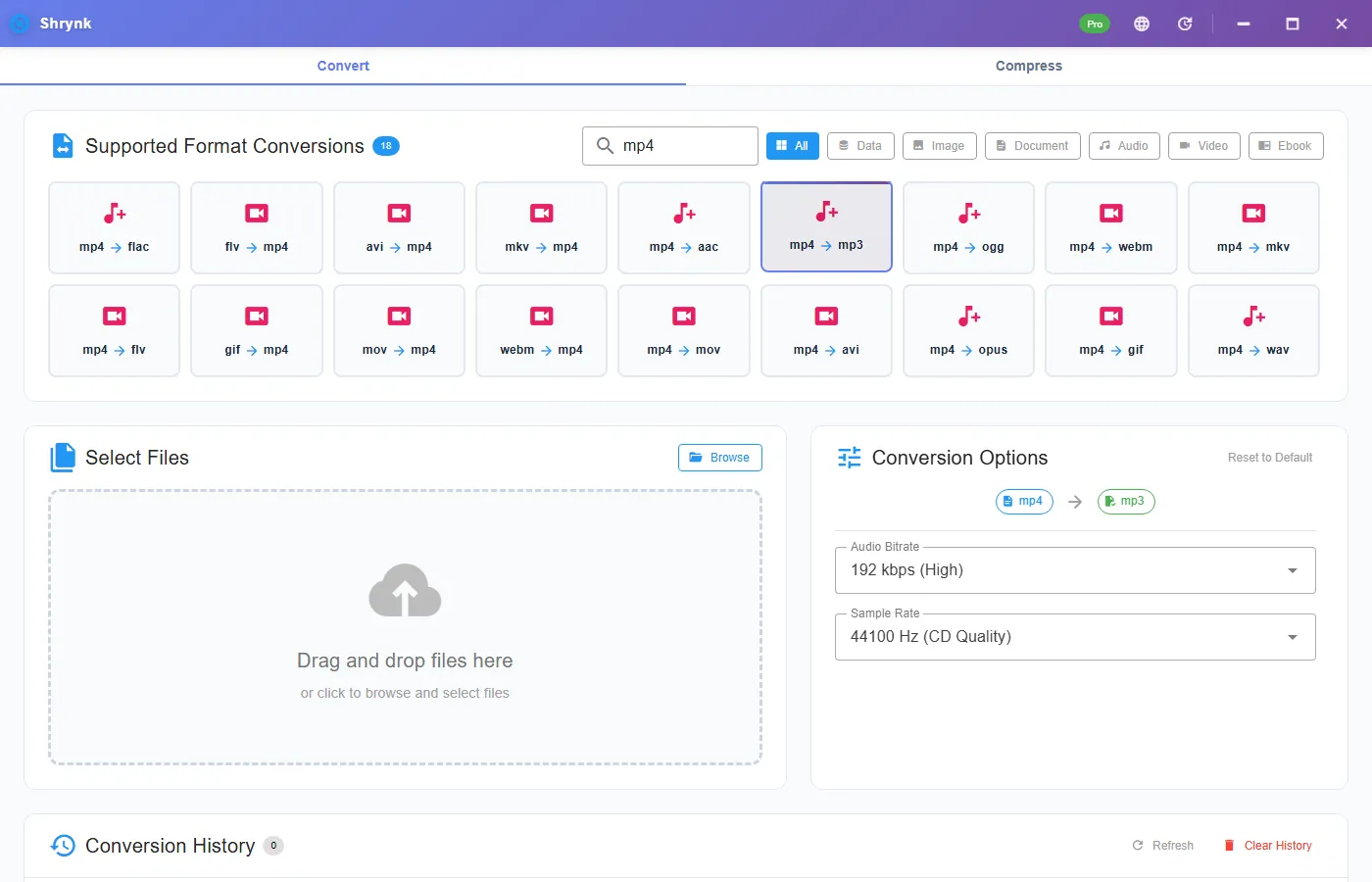
Steps for one lecture MP4
- Install Shrynk for Windows. First run if WebView2 is missing.
- Stay on Convert. Search
mp4(ormkv/movif that is the file you have). - Click mp4 → mp3. Do not click mp4 → aac unless you know the destination wants AAC.
- Leave 192k / 44100 for music-ish material. Drop to 128k for speech. Do not jump to 320k “to be safe” on a phone voice-over — you will only grow the file.
- Drop the file. Play the MP3 once on the PC before you delete the video. Check the first ten seconds and a quiet section in the middle.
Free = one file per run. A folder of recorded Zooms is batch (Pro, $9 one-time). One mapping per run: all MP4→MP3, or all MKV→MP3. Do not mix extract and remux in the same batch.
Bitrate 128 vs 192 vs 320 on a real soundtrack
The video’s audio is already compressed (AAC inside most MP4s). Re-encoding to MP3 is a second lossy pass. 192k is the default because it is hard to hear on laptop speakers. 128k is fine for spoken word and cuts the file by about a third versus 192k. 320k is for a music file you own and will keep; it will not restore a YouTube-rip that was already 128k AAC inside the MP4.
If you need a master for edit, extract to WAV or FLAC instead of MP3. Then you are not stacking MP3 on AAC. For a car playlist, do not do that — you will hate the size.
Other containers, same extractor
Search the extension you actually have. mkv → mp3 and mov → mp3 use the same bitrate / sample-rate panel. iPhone screen recordings are often MOV with AAC inside; extract still works. A silent screen recording produces a silent (or near-empty) MP3. That is not a crash. There was nothing to keep.
Multiple audio tracks (director commentary, a second language): the extractor takes the stream FFmpeg treats as default, usually track 0. If you needed commentary, this tool is the wrong one; use a multiplexer that lets you pick a stream index. Shrynk does not expose track pickers on this pair.
Failures that look like bugs
- The MP3 is 2 seconds of hiss. The “video” was images with no audio stream, or a slideshow export. Open the source in VLC and look at the audio meter first.
- Voice is there but music is thin. You started from a heavily compressed stream and picked 128k. Re-run from the original video at 192k. Do not MP3→MP3 the first export.
- The site compressor rejected the file or wrote another MP4. Correct. Extract is desktop Convert only. See how conversion works.
- DRM / rented movie. Encrypted files fail. We will not help strip that.
What this will not do
- Download from a URL or “YouTube to MP3.”
- Keep the video track. That is container convert or Compress.
- Extract to M4A. Targets are MP3, AAC, WAV, FLAC, OGG, OPUS. If you already have M4A, use the audio converter.
- Karaoke / isolate vocals / change pitch.
A 90-minute lecture, numbers you can check
A 90-minute 1080p lecture MP4 is often 400–900MB. The AAC inside is commonly 128–160 kbps. Extract at 128k MP3 and you should land in the 80–100MB band (128000 bits/s × 5400 s / 8). Extract at 192k and you are closer to 120–140MB. If your MP3 is 4MB, you extracted a 4-minute file or a silent slate. If it is 800MB, you clicked a video remux by mistake.
Play 0:00, 30:00, and the last 10 seconds. Lecture captures sometimes have a dead tail after the host hung up. That tail is in the MP3 too. Trim in an audio editor if you care; this pair does not expose in/out points.
FAQ
Does converting MP4 to MP3 keep the video?
No. Picture is discarded. Use Compress if you still need frames.
What bitrate should I use?
Default 192k. Speech: 128k. Music you own: 256–320k. You cannot recover what the video already threw away.
Can I do a whole folder?
Yes, Pro, one extract mapping. Same rules as folder batch.
Does this upload the lecture?
No. Desktop convert reads a path. Privacy: local files.
Extract on the PC: download Shrynk. Free for one file. $9 one-time for batch.