Convert MP4 to WAV When the Editor Refuses a Soundtrack MP3
People search “MP4 to WAV” after a DAW, a sampler, or a hardware booth rejects MP3. They already have the talk or the music inside a video. This is still extraction: the picture is discarded. It is not MP4 to MP3 with a different extension, and it is not MP3 to WAV (that source is already audio). Pick the card that matches the file on disk.
Shrynk registers MP4, AVI, MKV, MOV, WebM, FLV → WAV on the same extractor as MP3/FLAC/OGG. The browser compressor only writes H.264 MP4. It will not give you a WAV.
WAV vs MP3 vs FLAC from the same video
| Target | When | Panel |
|---|---|---|
| WAV | Reaper, Ableton, a booth that lists WAV only | Sample rate only. File is huge. |
| MP3 | Car, phone, “just the lecture” | Bitrate 128–320k, default 192k. See the MP3 guide. |
| FLAC | Archive that must stay lossless from this decode forward | No bitrate. Smaller than WAV, still not “better than the AAC inside the MP4.” |
| You wanted a smaller video | Wrong family | Compress, not extract. |
WAV does not remaster a YouTube-rip AAC. It skips a second MP3 pass. That is the only quality argument that is true.
What the panel actually shows
WAV is not a lossy target, so there is no 128k / 192k / 320k dropdown. You get sample rate: 22050 / 44100 / 48000, default 44100. Leave 44100 for music and most lectures. Set 48000 only if the session or the booth wrote “48 kHz” on the spec. 22050 makes speech thinner; use it only for a scratch that must stay tiny — and even then MP3 is usually the better tiny file.
There is no track picker, no in/out trim, no loudness normalize. Default audio stream, whole file.
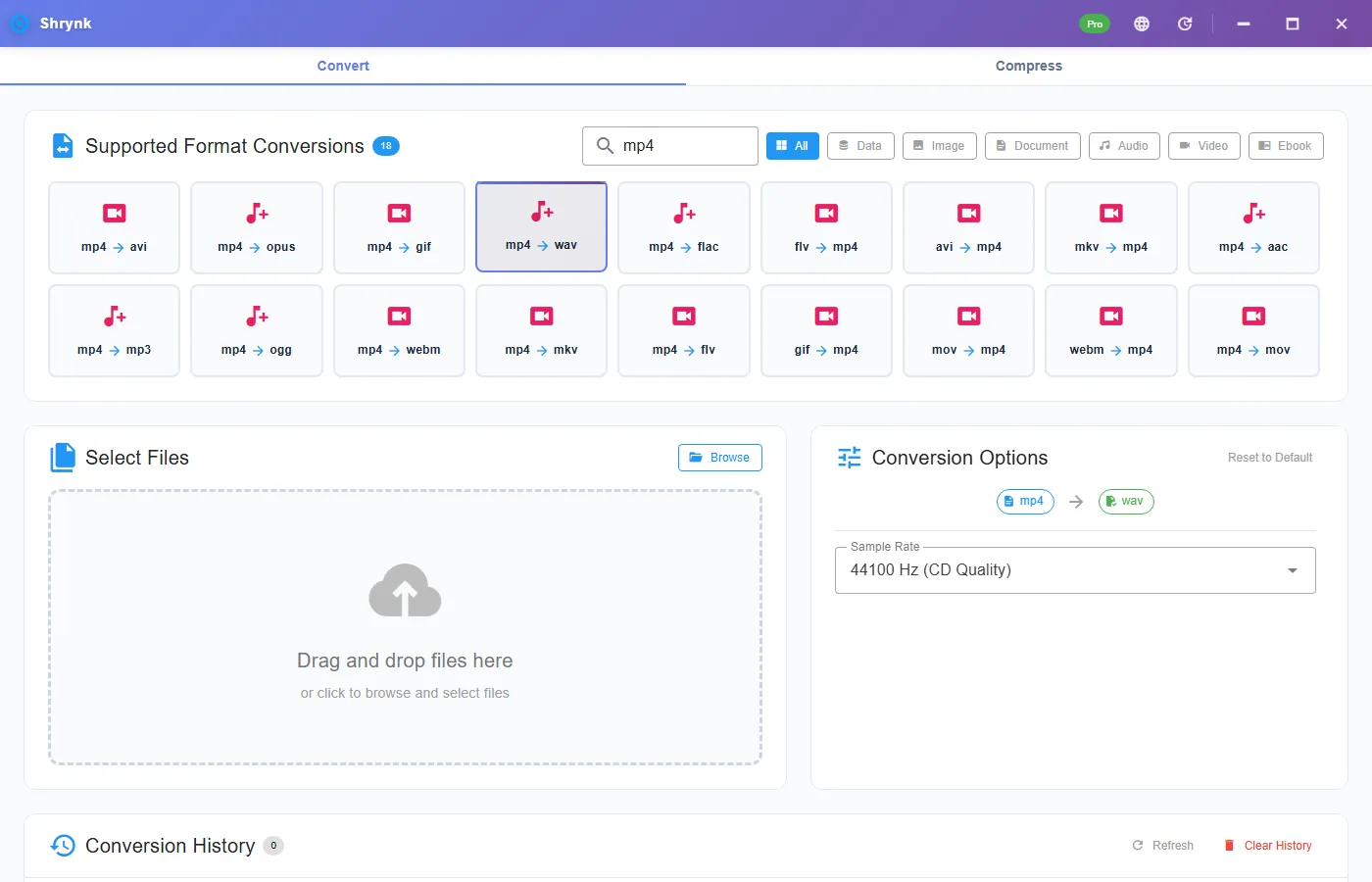
Steps for one camera clip
- Install Shrynk. First run if WebView2 is missing.
- Convert → search
mp4(ormov/mkvif that is the file). - Click mp4 → wav. Leave 44100 unless the DAW session is 48k.
- Drop the file. Look at the size before you import: a 5-minute stereo clip should be on the order of 50MB, not 5MB.
- Import the WAV. Check 0:00 and a quiet section. If the meter is dead, the video had no audio stream.
Free = one file. A folder of recorded talks is Pro. Output next to the source or into a drive that can hold ~10MB per minute. Do not target the 128GB OS disk for a weekend of 4K talks.
How big: do the multiply first
Uncompressed stereo 16-bit 44.1 kHz is about 10.6 MB per minute (44100 × 2 × 2 × 60). A 90-minute lecture is ~950MB of WAV. The same extract as 128k MP3 is ~80–100MB. If you only need to listen, you wanted mp4 → mp3. If the WAV is 8MB for a one-hour class, you extracted a slate, a wrong file, or you are looking at the MP4.
iPhone screen recordings (often MOV) use the same extractor: mov → wav. Silent recordings produce a silent WAV. That is not a crash.
DAW checklist after extract
Match the session rate to the WAV. If you extract at 44100 and the session is 48000, the DAW resamples on import — fine for a scratch, sloppy if you will bounce a master. Extract again from the video at 48000; do not WAV→WAV to “fix” the clock.
Clipping on import means the video’s soundtrack was already hot. WAV did not add headroom. Normalize in the editor. We do not offer a channels picker: stereo stays stereo. Commentary track 2 is not in the file unless it was the default stream.
Hardware boxes that want Broadcast WAV / BWF or 24-bit will still complain. This pair writes a normal PCM WAV. That covers Reaper and most booth PCs. It does not cover every 1998 sampler list. If the box blinks “unsupport,” read its spec before you blame Shrynk.
Failures that look like bugs
- The WAV is enormous and “sounds the same.” Correct. You avoided MP3, you did not invent highs.
- Two seconds of hiss. No audio stream, or a slideshow export. Open the source in VLC and watch the meter first.
- You used Compress. You got another MP4. Extract is Convert only.
- You converted an MP3 named like a movie. Wrong family. Use mp3 → wav.
What this will not do
- YouTube / URL download. “youtube to mp3” is not this product.
- Keep the video. That is container convert or Compress.
- Stem split, vocal isolate, or a 24-bit / split-mono picker.
- DRM / rented files.
A 10-minute test you can repeat
Take a 10-minute MP4 you know has speech. Extract WAV at 44100. Properties should show ~100MB (± a channel). Play 0:00, 5:00, and 9:50. Then extract the same file as MP3 at 192k and compare sizes. If the WAV and MP3 are within 2MB of each other, you clicked the wrong card. If the WAV is 1GB, you started from a two-hour file or 48k without noticing duration.
Keep the MP4 until the DAW bounce is done. Shrynk does not delete the video. Two extracts from the same MP4 (WAV for edit, MP3 for the client) is the intended workflow — not WAV→MP3→WAV.
MOV, MKV, and “video to wav”
Bing also shows “video to wav” and “mov to mp3.” Same extractor: search the extension you have, click → wav. An iPhone Voice Memo that is already .m4a is not this page — that is the audio mesh. An iPhone screen recording that is .mov with a picture is this page. Two seconds in VLC (video track or not) tells you which card to click.
FLAC from the same video is the middle size: lossless from the decode forward, smaller than WAV. Use FLAC if you will archive and the DAW accepts it. Use WAV if the booth’s paper says WAV. Do not extract WAV and FLAC “to be sure.” One decode, one working file.
After the session, deliver with wav → mp3 at 192k if the client asked for MP3. That encode is of your edited PCM. Stacking extract-MP3 then WAV then MP3 is how a lecture turns to mush. Keep the video until the bounce is signed off. Free vs Pro is still one file vs a folder — extract does not use the 100MB compress cap.
FAQ
Better than MP3?
No second MP3 pass. No restored AAC. Use WAV for editors, MP3 for listening.
Why no bitrate?
WAV is PCM here. Sample rate 44100 default. 48k only when the session is 48k.
MKV / MOV too?
Yes, same extractor. Matrix: supported formats.
Already have an MP3?
MP3 to WAV, not this page.
Download Shrynk. Free for one file. $9 one-time for batch.