Convert MP3 to WAV When the Editor Refuses MP3 — Not to “Uncompress Quality”
A sampler, a hardware booth, or an old DAW import list that only says WAV does not care that your source is a 320k MP3. It wants PCM in a .wav box. That conversion is real and useful. It is not a remaster. Everything MP3 already discarded stays discarded; you just stop asking the editor to decode MPEG on import.
This is the opposite job of M4A/WAV to MP3. Do not run both “to be sure.”
WAV vs FLAC vs staying on MP3
| Need | Target | Size |
|---|---|---|
| Reaper / Ableton / a sampler that wants WAV | WAV | Largest. Typical ~10× a 192k MP3. |
| Archive that must stay lossless from here on | FLAC | Smaller than WAV, still not “better than the MP3.” |
| Car / phone / form that asked for MP3 | Stay MP3 | You are on the wrong page. |
| You thought WAV would add sparkle | Do not convert | Placebo. Keep the MP3. |
What the panel shows
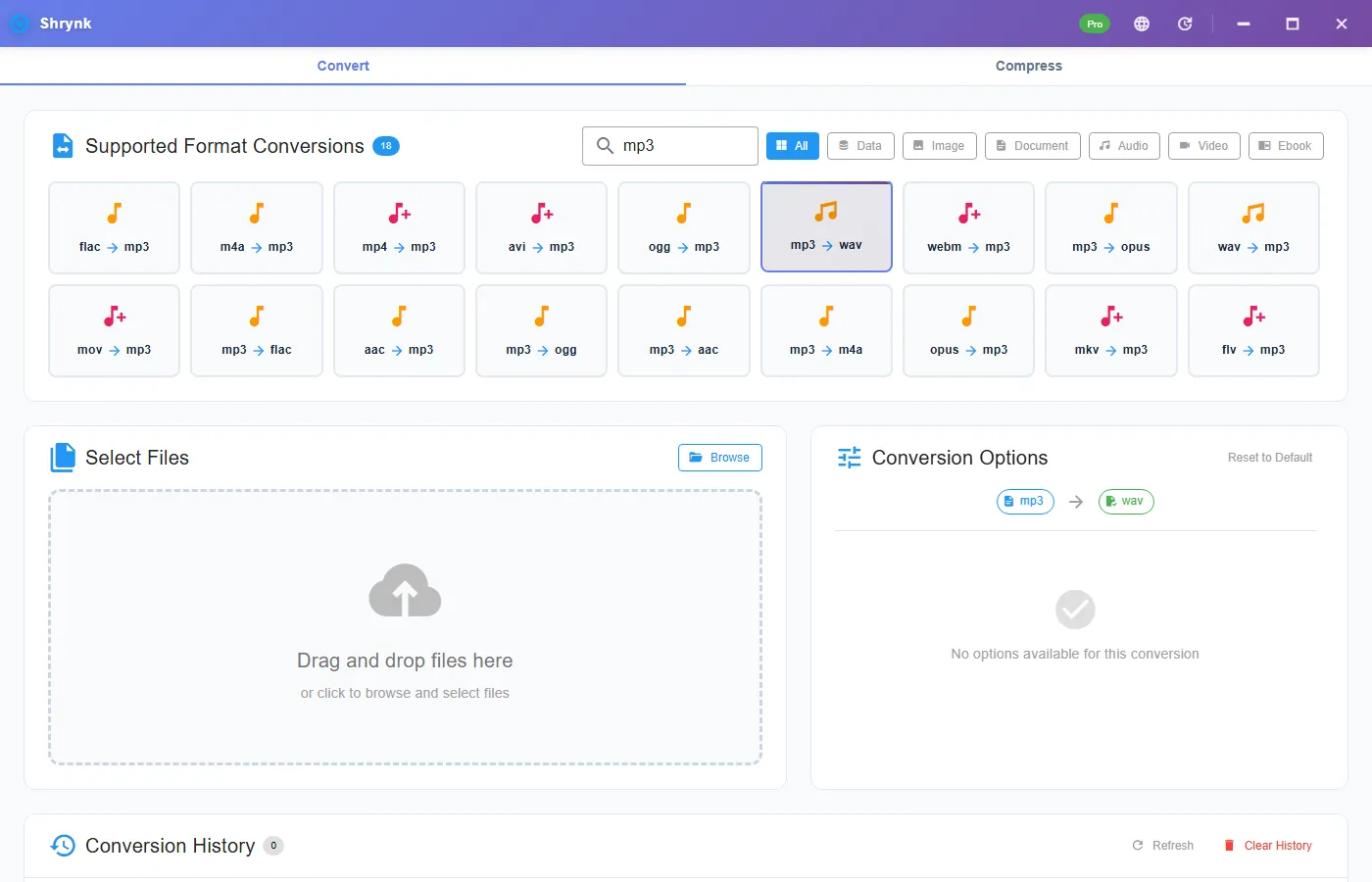
WAV and FLAC are not lossy targets, so there is no 128–320k bitrate dropdown. You still get sample rate: 22050 / 44100 / 48000, default 44100. Leave 44100 for music that already lived at 44.1. Set 48000 only if the session or the booth is 48k — resampling for fun adds a convert you did not need.
Steps
- Install Shrynk.
- Convert → search
mp3→ mp3 → wav. - Leave 44100 unless the destination wrote “48 kHz” on the spec sheet.
- Drop one MP3. Look at the size: a 5MB MP3 becoming 40–55MB WAV is normal, not a bug.
- Import the WAV into the editor. If the editor still fails, it may want a bit depth or channel layout this pair does not expose (we do not offer a 24-bit / split-stereo picker).
Free = one file. A stem folder is Pro. The browser tool is video compress. First run.
Going back to MP3 after the edit
Export or convert wav → mp3 at 192k (default) for delivery. That is a new lossy encode of your edited PCM. Do not take the WAV, MP3 it, then WAV that MP3 again. Each MP3 pass hurts. Keep the WAV (or the editor project) as the working copy.
Failures that look like bugs
- “It sounds the same but eats the SSD.” Correct. That is WAV.
- Booth still rejects. Some want Broadcast WAV / BWF or a specific bit depth. This tool writes a standard WAV, not a radio-cart profile.
- You used extract (mp4 → wav) on an MP3. Wrong card family. Audio mesh only.
What this will not do
- Restore highs MP3 removed.
- Change tempo, key, or loudness.
- Split a podcast into tracks.
How big will the WAV be?
Uncompressed stereo 16-bit 44.1 kHz is about 10.6 MB per minute (44100 × 2 channels × 2 bytes × 60). A 4-minute MP3 becomes ~42MB WAV. A 60-minute podcast MP3 becomes ~630MB WAV. If your WAV is 6MB for a one-hour show, you are still looking at an MP3 or you set 22050 by accident. If it is 2GB, you may have a 48 kHz 24-bit path you did not mean — this pair is not offering a 24-bit picker, so first check duration.
Hardware samplers often want 44.1 and 16-bit stereo or mono. We do not split to mono or offer “pad to 16 bars.” If the sampler rejects the WAV, read its spec: some want Broadcast WAV, some hate IEEE float. This tool writes a normal PCM WAV. That covers Reaper, Ableton, and most booth PCs. It does not cover every 1998 hardware list.
Do not convert an MP3 to WAV “to upload to DistroKid as a master.” The store will get a large file of MP3 damage. A master is a WAV (or FLAC) that never went through MP3. If MP3 is all you have, deliver the MP3 or admit it is a lossy source.
Batch: a DJ folder of 50 MP3s to WAV will eat tens of gigabytes. Pro will do it. Put output on a disk that is not the 128GB OS drive. Shrynk writes new files; it does not replace the MP3. Keep the MP3s if the WAV is only for one session. Nothing uploads.
Opposite direction after the session: wav → mp3 at 192k, same audio mesh as M4A to MP3. One encode for delivery. Then stop.
DAW import checklist
After convert, import the WAV and look at the clip gain. If it clips, the MP3 was already hot; WAV did not add headroom. If it is quiet, do not “normalize” by converting again. Normalize in the DAW. Sample rate of the session should match the WAV (44100 default). If the session is 48k and you left 44100, the DAW will resample on import — that is fine for a scratch, sloppy for a master.
Mono voice vs stereo music: we do not offer a channels picker. A stereo MP3 becomes a stereo WAV. A mono MP3 should come out mono. If a sampler wants mono and you have stereo, bounce in the DAW. That is out of scope for a format pair.
Windows Media Player will play the WAV and tell you nothing useful. The editor is the test. If Ableton imports and the waveform matches the MP3’s shape, you are done. If a hardware box blinks “unsupport,” try 44100 again from the MP3 (do not stack WAV→WAV). Still failing: that box wants a different container (AIFF, SDII) we do not list. Audio mesh is MP3/AAC/FLAC/OGG/OPUS/M4A/WAV only.
Disk plan: 10 hours of music as WAV is ~6GB. Do the multiply before you click Pro batch on a laptop with 8GB free. Output to an external drive. Shrynk will not warn you that the volume is full until the write fails. Keep the MP3s; they are the small copies.
CD-style 44.1 kHz is the default because most MP3s came from that world. Film/video sessions at 48 kHz should set 48000 on this pair so the DAW does not resample twice (once here, once on import). Pick one clock and stick to it for the project. If you are unsure, leave 44100 and let the DAW show you the clip rate — then match it on the next file instead of guessing 22050, which makes everything thin.
FAQ
Quality upgrade?
No. Compatibility upgrade. Same decoded audio, bigger file.
Sample rate?
Default 44100. Use 48000 only when the session is 48k.
Need MP3 for the car instead?
Audio to MP3. Pair list: formats.